说明
在网页中,有些元素的样式是变化的,vue 的 class绑定,就是用来控制 动态样式变化 的
实现方式
使用 v-bind:class 指令,简化写法 :class
其值有以下几种:
- 字符串
- json对象
- 数组
案例-值为字符串
应用场景:一般多使用这种方式,较为简单,也可以实现切换样式
效果图如下,点击下面按钮可以切换 class样式 :

代码
<style>
    .basic{
        width: 300px;
        height: 200px;
        border: 1px black solid;
        color: white;
    }
    .my_blue{
        background-color:blue;
    }
    .my_green{
        background-color:green;
    }
    .my_red{
        background-color:red;
    }
</style>
<body>
<div id="app">
    class="basic"是基础样式,v-bind:class="msg_class"动态绑定样式
    <div class="basic" v-bind:class="msg_class">{{msg}}</div> 绑定样式<br/>
    <div class="basic" :class="msg_class">{{msg}}</div> 简化写法<br/>
    <input type="button" value="蓝色" @click="changeBlue">
    <input type="button" value="绿色" @click="changeGreen">
    <input type="button" value="红色" @click="changeRed">
</div>
<script src="https://cdn.jsdelivr.net/npm/vue@2/dist/vue.js"></script>

<script>
    var vm = new Vue({
        el: '#app',
        data:{
            msg:'绑定class',
            msg_class:'my_blue'//指定 msg_class
        },
        methods:{
            changeBlue:function(){
                console.log("原来:"+this.msg_class)
                this.msg_class='my_blue'//修改msg_class
                console.log("现在:"+this.msg_class)
            },
            changeGreen:function(){
                console.log("原来:"+this.msg_class)
                this.msg_class='my_green'//修改msg_class
                console.log("现在:"+this.msg_class)
            },
            changeRed:function(){
                console.log("原来:"+this.msg_class)
                this.msg_class='my_red'//修改msg_class
                console.log("现在:"+this.msg_class)
            }
        }
    })

</script>
解释: 查看网页源代码,会发现:源代码中的 class样式 和 :class 样式,都在 网页源代码的 class 中,在点击按钮时,会改变 msg_class属性的值,也就改变的 class 样式

指定多个类样式
<style>
    .basic{
        width: 300px;
        height: 200px;
        border: 1px black solid;
        color: white;
    }
    .my_blue{
        background-color:blue;
    }
    .my_green{
        background-color:green;
    }
    .my_red{
        background-color:red;
    }
    .big_txt{
        font-size:20px;
    }
    .small_txt{
        font-size:9px;
    }
</style>
<script>
    var vm = new Vue({
        el: '#app',
        data:{
            msg:'绑定class',
            msg_class:'my_blue big_txt'//指定msg_class 和 big_txt 类样式
        }
    })

</script>
案例-json
应用场景:用于切换样式,当绑定样式的数量确定、样式名字确定时,推荐使用
实现下图效果:
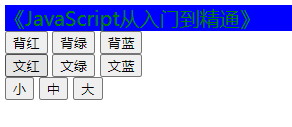
css:
<style type="text/css">
    .txt_red{
        color: red;
    }
    .txt_green{
        color: green;
    }
    .txt_blue{
        color: blue;
    }
    .txt_small{
        font-size: 10px;
    }
    .txt_middle{
        font-size: 20px;
    }
    .txt_big{
        font-size: 30px;
    }
</style>
html:
<div id="app">
    <!--<div class="bg_blue   txt_red   txt_middle">-->

    <div v-bind:class="cntCls">
        JavaScript 从入门到精通
    </div>
    <input type="button" value="红" v-on:click="txtRed"/>
    <input type="button" value="绿" v-on:click="txtGreen"/>
    <input type="button" value="蓝" v-on:click="txtBlue"/>
    <br>
    <input type="button" value="小" v-on:click="txtSmall"/>
    <input type="button" value="中" v-on:click="txtMiddle"/>
    <input type="button" value="大" v-on:click="txtBig"/>


</div>
js:
<script src="js/vue.js"></script>
<script type="text/javascript">
    var vm = new Vue({
        el:'#app',//选择器: id 样式、元素选择器等  但元素选择器不能绑定body html元素
        data:{
            // 不方便动态改变样式
//                    cntCls:"bg_blue txt_red txt_middle"
            cntCls:{
                txt_red:true,
                txt_blue:false,
                txt_green:false,
                txt_middle:true,
                txt_middle:true,
                txt_small:false,
                txt_big:false,
            }

        },
        methods:{

            txtRed:function(){
                this.cntCls.txt_red = true
                this.cntCls.txt_blue = false
                this.cntCls.txt_green = false
            },
            txtGreen:function(){

                this.cntCls.txt_red = false
                this.cntCls.txt_blue = false
                this.cntCls.txt_green = true
            },
            txtBlue:function(){
                this.cntCls.txt_red = false
                this.cntCls.txt_blue = true
                this.cntCls.txt_green = false

            },
            // 切换成小号字
            txtSmall:function(){
                this.cntCls.txt_small = true
                this.cntCls.txt_middle = false
                this.cntCls.txt_big = false
            },
            // 切换成中号字
            txtMiddle:function(){
                this.cntCls.txt_small = false
                this.cntCls.txt_middle = true
                this.cntCls.txt_big = false
            },
            // 切换成大号字
            txtBig:function(){
                this.cntCls.txt_small = false
                this.cntCls.txt_middle = false
                this.cntCls.txt_big = true
            }
        }
    });
</script>
案例-数组方式
应用场景:实现添加、删除多个样式
效果图如下,点击按钮可以添加、删除多个样式:

css
<style>
    .basic{
        width: 400px;
        height: 100px;
        border: 1px black solid;
    }
    .c1{
        color: red;
    }
    .c2{
        font-size: 24px;
    }
    .c3{
        background-color: blue;
    }
</style>
html
<div id="app">
    添加、删除多个样式<br>
    <div class="basic" :class="msg_class">
        {{msg}}<br>
    </div> <br/>
    <input type="button" value="添加红色字" @click="addClass('c1')">
    <input type="button" value="添加大号字" @click="addClass('c2')">
    <input type="button" value="添加蓝色背景" @click="addClass('c3')"><br>
    <input type="button" value="删除红色字" @click="delClass('c1')">
    <input type="button" value="删除大号字" @click="delClass('c2')">
    <input type="button" value="删除蓝色背景" @click="delClass('c3')">
</div>
js
<script src="https://cdn.jsdelivr.net/npm/vue@2/dist/vue.js"></script>

<script>
    var vm = new Vue({
        el: '#app',
        data:{
            msg:'绑定class',
            msg_class:[]//定义msg_class
            // msg_class:'c1 c2 c3'//这么写也可以,但不方便增加、删除样式
        },
        methods:{
            addClass:function(c){
                var index=this.msg_class.indexOf(c)
                if(index<0){
                    this.msg_class.push(c)
                }
                console.log(this.msg_class)
            },
            delClass:function(c){
                var index=this.msg_class.indexOf(c)
                if(index>=0){
                    this.msg_class.splice(index,1)
                }
                console.log(this.msg_class)
            }
        }
    })
</script>