概述
本文通过实现登录功能,讲解springmvc接收ajax请求,获取参数,返回json
json数据格式
{
    "code":0,
    "msg":"success"
}
格式参考:
https://developers.weixin.qq.com/doc/offiaccount/Custom_Menus/Deleting_Custom-Defined_Menu.html
https://ai.baidu.com/ai-doc/FACE/7k37c1ucj#%E8%BF%94%E5%9B%9E%E8%AF%B4%E6%98%8E
修改pom.xml
springmvc 需要依赖 jackson库,将 java类对象 转换成 json对象
原理见:
https://malaoshi.top/show_1EF61Bp7UvwW.html
添加依赖:
<dependency>
    <groupId>com.fasterxml.jackson.core</groupId>
    <artifactId>jackson-databind</artifactId>
    <version>2.9.1</version>
</dependency>
添加 jar 到 lib 目录
如果创建maven工程时,没使用archetype模板,需要按下图将 .jar 添加到 lib 目录,详见 链接


jquery
下载 jquery (右键另存为)
html代码
手机号:<input type="text" id="phone" /><br>
密码:<input type="password" id="password" /><br>
<input type="button" value="登录" onclick="doLogin()"/>
<script type="text/javascript" src="js/jquery-1.11.0.min.js"></script>
<script type="text/javascript">

    function doLogin(){

        var phone=$("#phone").val();
        var password=$("#password").val();

        $.ajax({
            url:'doLogin',
            type:'post', //使用post方法
            dataType:'json',//服务器端返回的数据格式是json
            data: {
                "phone":phone,
                "password":password
            },//发给服务器端的数据
            success:function(data){   //data:服务器端返回给浏览器端的数据
                if(data.code==0){
                    alert("登录成功,跳转首页!");
                    // location.href='index.html';
                }else{
                    alert(data.msg)
                }
            },
            error:function (XMLHttpRequest, textStatus, errorThrown) {
                alert(XMLHttpRequest);
                alert(textStatus);
                alert(errorThrown);
            }

        });
    }

</script>
说明:
通过jquery实现ajax请求
并且通过
dataType:'json',指明 服务器返回json数据格式
发送后台的是 json对象。data: { "phone":phone, "password":password }
Controller方法
@RequestMapping("/doLogin")
@ResponseBody
public JsonResult login(String phone,String password){
    System.out.println(phone+"-"+password);

    JsonResult jr=new JsonResult(0,"登录成功!");
    return jr;
}
说明:
@ResponseBody:由于是 ajax 发来的请求,并且前台要求服务器返回 json数据格式,所以需要在方法上声明@ResponseBody注解,该注解的作用:springmvc 使用 jackson库,将返回的 java类对象 转换成 json对象参数对应如下图:
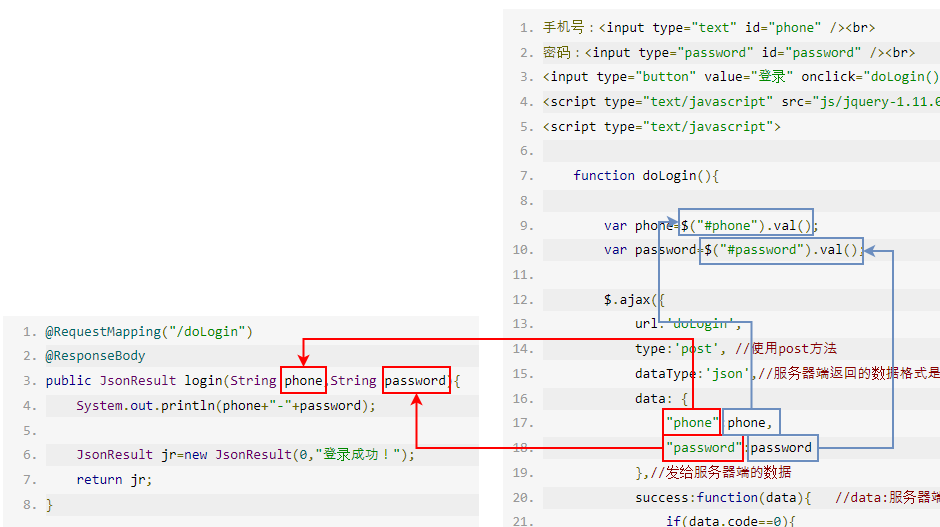
JsonResult:将返回给前台的数据,封装到JsonResult类中,源代码见下面
JsonResult代码
Controller将返回前台的数据封装到 JsonResult 类对象中
一般该类有:
int code:0表示成功,非0表示失败String msg:提示信息,如:success
完整代码如下:
public class JsonResult {
    private int code;
    private String msg;

    public JsonResult() {
    }

    public JsonResult(int code, String msg) {
        this.code = code;
        this.msg = msg;
    }

    public int getCode() {
        return code;
    }

    public void setCode(int code) {
        this.code = code;
    }

    public String getMsg() {
        return msg;
    }

    public void setMsg(String msg) {
        this.msg = msg;
    }
}