说明
使用 Path 可以绘制复杂的不规则图形
官方教程地址
http://fabricjs.com/fabric-intro-part-1#objects
坑
添加到canvas后,再调整宽度,默认图形不会跟着改变宽度,只会改变 选择框的宽度
函数
fabric.Path( path )
参数解释:
path:是由
M、L、Z等组成的指令(注意:必须全大写),与SVG <path>元素非常相似。它们使用相同的命令集:M代表“移动”命令,这个M 00代表把画笔移动到(0,0)点坐标。L代表“线”,L 200 100的意思是使用钢笔画一条线,从(0,0)坐标画到(200,100)坐标。Z代表让图形闭合路径
注意: 在适当的场景中要使用 闭合,否则会出现 JavaScript canvas绘制图形-不能用直线画三角形 文中的bug
例子
绘制箭头直线
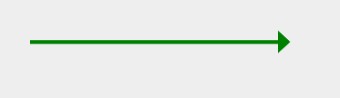
<canvas id="canvas"></canvas>
<script>

  // Initiate a canvas instance
  var canvas = new fabric.Canvas("canvas");
  canvas.setWidth(document.body.scrollWidth);
  canvas.setHeight(250);

  /*
  * 生成箭头直线的path
  * @leight  箭头直线长度
  * strokeWidth 线宽度
  */
  const buildArrowLinePath = (leight = 200,strokeWidth = 2) => {
      // 向右箭头的垂直高度
      const heightArrow = strokeWidth * 2 + 5
      // 直线结束点位置
      const end = [leight,0]
      // 右点位置
      const rightArrow = [end[0]+ strokeWidth*2, 0]
      // 上点位置
      const topArrow = [end[0], -heightArrow/2]
      // 下点位置
      const bottomArrow = [end[0],heightArrow/2]
      const path = `M 0 0 L ${end[0]} ${end[1]} M ${rightArrow[0]} ${rightArrow[1]} L ${topArrow[0]} ${topArrow[1]} L ${bottomArrow[0]} ${bottomArrow[1]}  Z`

      return path
  }
  const strokeWidth = 3
  const path = buildArrowLinePath(200,strokeWidth)
  const arrowLine = new fabric.Path( path, {
             left: 100,
             top: 40,
             fill: "green",
             strokeWidth: strokeWidth,
             stroke: "green",
  });
  canvas.add(arrowLine);
</script>
坑
上面案例,添加到 canvas 后,再调整宽度,默认图形不会跟着改变宽度,只会改变 选择框的宽度
如下图:

canvas.add(arrowLine);
arrowLine.width = 800
arrowLine.setCoords()
参考:
https://www.cnblogs.com/badaoliumangqizhi/p/15879520.html