准备:
在apilcoud云端控制台种添加push模块
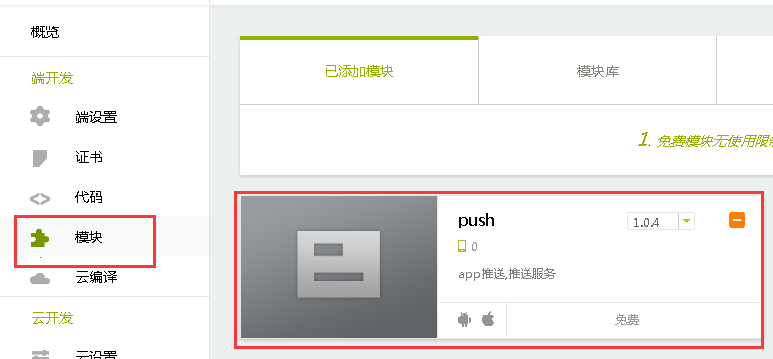
需要云编译为测试包,安装后,推送才好使。
注意:
如果是IOS,需要设置信任
如果是小米手机系统,需要在“自启动管理”中,开启app,否则收不到推送
实现原理:
接收到特定消息时,播放声音,要设置监听推送消息事件,当接收到消息时,判断消息的内容,如果符合要求,就播放声音。
此处注意
1.推送的类型必须是“消息”,不能是“通知”,否则不受监听器捕获
2.程序不能退出,如果退出,推送消息不走监听器
上代码
自定义用户id,绑定到APICloud推送服务器。然后给该用户id发推送消息,此用户的手机才能收到推送
var push = api.require('push');
        push.bind({
            userName: 'testName',//自定义用户name
            userId: 'testId'//自定义用户id
        }, function(ret, err){
            if( ret ){
                alert( JSON.stringify( ret) );
            }else{
                alert( JSON.stringify( err) );
            }
        });
注册监听消息事件,在首页中执行
function setListener() {
		var push = api.require('push');
		push.setListener(function( ret, err ){
		     if( ret ){
		     	/*
		     	 * ret是json对象,{"type":0,"data":["数据"]}
		     	 *
		     	 */
		        //alert( JSON.stringify( ret) );
		        if(ret.data){
		        	for(var i=0;i<ret.data.length;i++){
		        		var temp=ret.data[i];
		        		//alert(temp);
		        		if(temp=='呼叫'){
		        			api.startPlay({
							    path: 'widget://res/3D.mp3'
							}, function(ret, err) {
							    if (ret) {
							        api.toast({msg:'播放完成'});
							    } else {
							        alert(JSON.stringify(err));
							    }
							});

		        		}
		        	}
		        }

		     }else{
		        alert( JSON.stringify( err) );
		     }
		});
	}
发推送消息
此处的type必须是1,表示消息,如果是2(通知),监听器捕获不到推送的消息
function push(title,type) {
		var now = Date.now();
		var appKeySha = SHA1(KEY.appId+"UZ"+ KEY.appKey+"UZ"+now)+"."+now;
	    api.ajax({
	        url : 'https://p.apicloud.com/api/push/message',
	        method : "post",
	        headers : {
	            "X-APICloud-AppId" : KEY.appId,
	            "X-APICloud-AppKey" : appKeySha
	        },
	        dataType : "json",
	        data : {
	            "values" : {
	                "title" : title,
	                "content" : '呼叫',
	                "type" : type, //– 消息类型,1:消息 2:通知
	                "platform" : 0, //0:全部平台,1:ios, 2:android
	            //    "groupName" : "department", //推送组名,多个组用英文逗号隔开.默认:全部组。eg.group1,group2 .
	                "userIds" : "testId" //上面代码自定义的用户id,推送用户id, 多个用户用英文逗号分隔,eg. user1,user2。
	            }
	        }
	    }, function(ret, err) {
	        //coding...
	        if(ret){
		        alert(JSON.stringify(ret));
	        }else{
		        alert(JSON.stringify(err));
	        }
	    });
	}