说在前面:
apicloud云端数据库是nosql型,即非关系型数据库,所以处理关联查询不那么强大,而且我们在设计数据库时也要注意,尽量不要发生关联查询。
1. 案例:
类似微博、博客等发文章的功能,有文章表、用户表,文章与用户的关系是【多对一】,在【查询文章时】,也【一并查询出用户的信息】,此时需要在【文章表中建立pointer类型】的字段
首先设计文章表article,文章表里有标题、内容等。是【多对一】中的【多】
然后设计用户表user,表里有用户名等信息。是【多对一】中的【一】
文章表和用户表关系
一篇文章对应一个用户,一个用户可以发布多篇文章,文章表与用户表的关系是多对一
设计方式一:
如果在文章表中添加一个authorName字段,用于保存用户姓名,会有一个问题,当用户改名后,需要同步修改authorName字段的用户名。
设计方式二:
在文章表中添加pointer类型的字段author,指向user表,在该字段里保存用户的id。查询文章时也一并查询用户名。
文章表的一条记录,对应user表的一条记录。
1.1. article表结构

用pointer类型的字段author,指向表user,注意此处是同名
1.2. user表结构
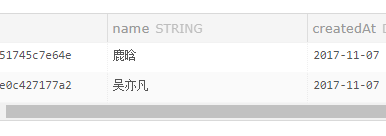
注意:article表中pointer类型的字段,指向
表,由于是pointer类型,所以是一对一的关系,即article表的一条记录,对应user表的一条记录,这也符合文章与用户的一对一的关系。
2. 查询
2.1. 传统方式的查询
var client = new Resource("", "");
        var Model = client.Factory("article");
        Model.query({
            filter:{
            }
        }, function(ret,err){
            if(err){
                //处理错误 err
            }else{
                //处理数据 ret
//                alert(JSON.stringify(ret));
            }
        })
返回的结果如下:
[
    {
        "id": "596eb88bde3cf3f76e95dca2",
        "title": "html页面设计",
        "createdAt": "2017-07-19T01:40:27.429Z",
        "updatedAt": "2017-11-07T05:22:14.162Z",
        "author": "5a0142401966fe0c427177a2"
    },
    {
        "id": "596ed0eb18d524980ee22625",
        "title": "java从入门到放弃",
        "content": "阿斯顿解放路",
        "createdAt": "2017-07-19T03:24:27.168Z",
        "updatedAt": "2017-11-07T05:21:26.059Z",
        "author": "5a01424723ad051745c7e64e"
    }
]
注意:author的值为id
2.2 通过关系查询article表,返回article表记录,同时返回user的结果
此处需要用到include关键字,对应的值是article表中pointer类型的字段名+Pointer关键字
代码如下:
var client = new Resource("", "");
        var Model = client.Factory("article");
        Model.query({
            filter:{
"include":"authorPointer"//关键代码。pointer类型的字段名+Pointer
            }
        }, function(ret,err){
            if(err){
                //处理错误 err
            }else{
                //处理数据 ret
//                alert(JSON.stringify(ret));

            }
        })
结果如下:
[
    {
        "id": "596eb88bde3cf3f76e95dca2",
        "title": "html页面设计",
        "createdAt": "2017-07-19T01:40:27.429Z",
        "updatedAt": "2017-11-07T05:22:14.162Z",
        "author": {
            "id": "5a0142401966fe0c427177a2",
            "name": "吴亦凡",
            "createdAt": "2017-11-07T05:18:56.628Z",
            "updatedAt": "2017-11-07T05:18:56.628Z"
        }
    },
    {
        "id": "596ed0eb18d524980ee22625",
        "title": "java从入门到放弃",
        "content": "阿斯顿解放路",
        "createdAt": "2017-07-19T03:24:27.168Z",
        "updatedAt": "2017-11-07T05:21:26.059Z",
        "author": {
            "id": "5a01424723ad051745c7e64e",
            "name": "鹿晗",
            "createdAt": "2017-11-07T05:19:03.404Z",
            "updatedAt": "2017-11-07T05:19:03.404Z"
        }
    },
    {
        "id": "596ed17301f226cc0b3d45f2",
        "title": "产品经理从入门到入土",
        "content": "绕太阳绕太阳测试了框架发到过",
        "createdAt": "2017-07-19T03:26:43.555Z",
        "updatedAt": "2017-11-07T05:21:57.321Z",
        "author": {
            "id": "5a0142401966fe0c427177a2",
            "name": "吴亦凡",
            "createdAt": "2017-11-07T05:18:56.628Z",
            "updatedAt": "2017-11-07T05:18:56.628Z"
        }
    }
]
2.3. 查询指定字段
代码:
用到”includefilter”关键字,对应值为指向的表名:{“user”:{“fields”:[“id”,”name”]}}
注意1:此处的user是表名,是author字段指向的表名字
注意2:fields中必须有id,否则报错
var client = new Resource("", "");
        var Model = client.Factory("article");
        Model.query({
            filter:{
                "fields":["id","title","author"],
                "include":"authorPointer",
                "includefilter":{"user":{"fields":["id","name"]}}//见上面的注意
            }
        }, function(ret,err){
            if(err){
                //处理错误 err
            }else{
                //处理数据 ret
//                alert(JSON.stringify(ret));
            }
        })
返回结果:
[
    {
        "id": "596eb88bde3cf3f76e95dca2",
        "title": "html页面设计",
        "author": {
            "id": "5a0142401966fe0c427177a2",
            "name": "吴亦凡"
        }
    },
    {
        "id": "596ed0eb18d524980ee22625",
        "title": "java从入门到放弃",
        "author": {
            "id": "5a01424723ad051745c7e64e",
            "name": "鹿晗"
        }
    },
    {
        "id": "596ed17301f226cc0b3d45f2",
        "title": "产品经理从入门到入土",
        "author": {
            "id": "5a0142401966fe0c427177a2",
            "name": "吴亦凡"
        }
    }
]
返回结果中article的结果有id、title、author对象,author对象中的字段有:id,name