案例
api文档讲解很清楚,本教程没有必要将每个知识点举例写一遍,而是结合真实案例,抓取数据
搜狐新闻的列表页面:http://www.sohu.com/c/8/1460 ,如下图,在该网页中,红框处是文章列表,得到文章信息页面的url连接,如下图
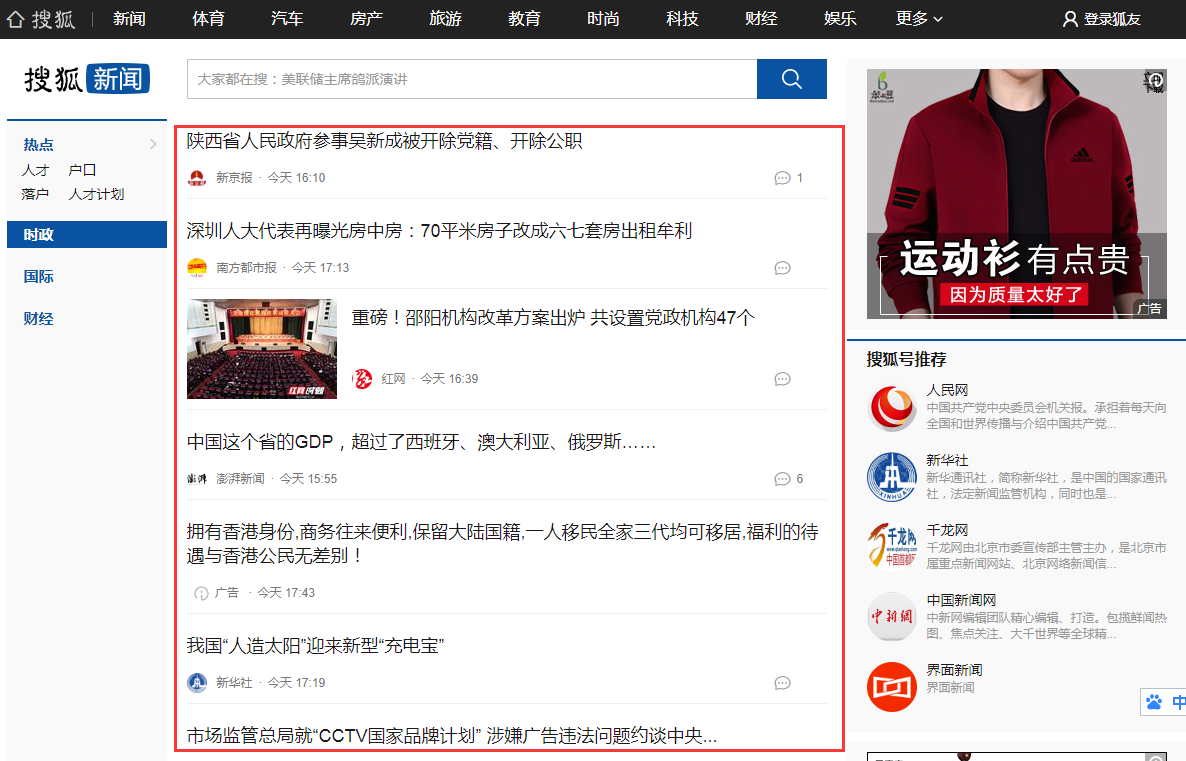
然后模拟浏览器发请求,得到文章信息页面的html代码,分析出文章标题、内容,如下图:
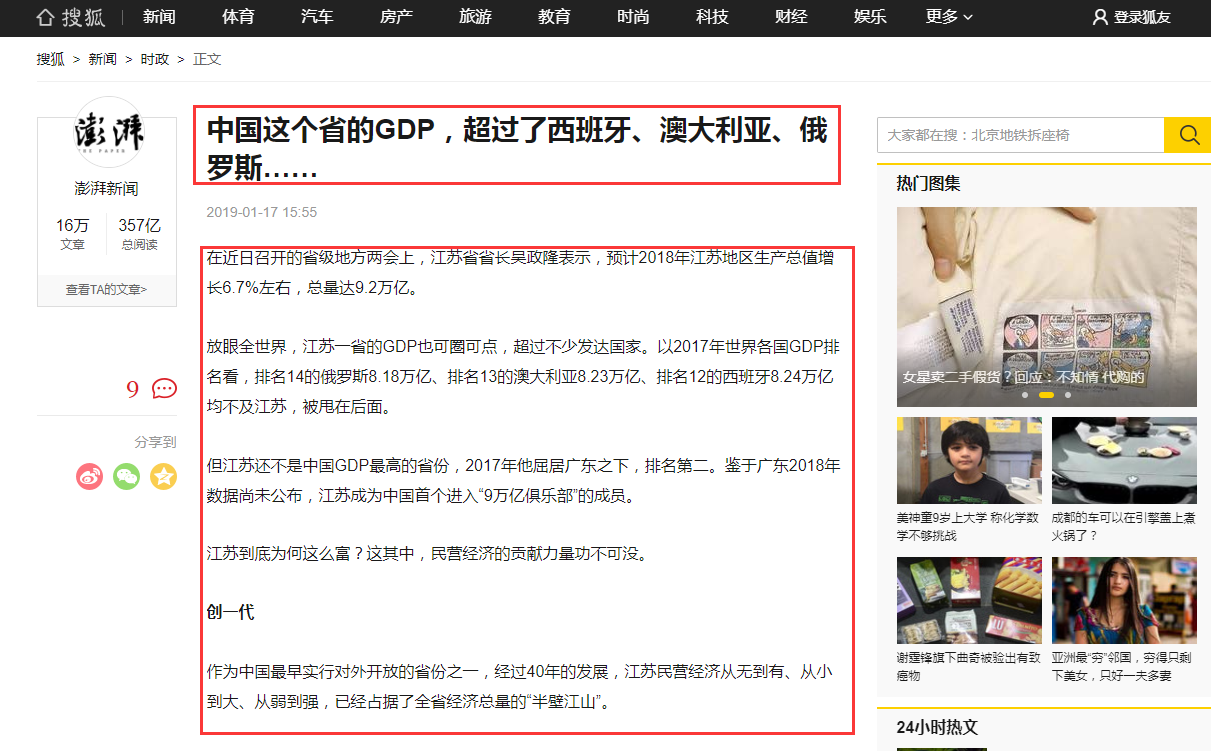
1. 通过requests发请求首页
import requests

url='http://www.sohu.com/c/8/1460'

session=None
def main():
    '''
    访问首页,并抓取信息列表的链接
    '''
    global session
    session=requests.session()
    with session.get(url) as resp:
        if resp.status_code == 200:
            print(resp.text)
2. 通过浏览器分析网页,找出文章列表的url
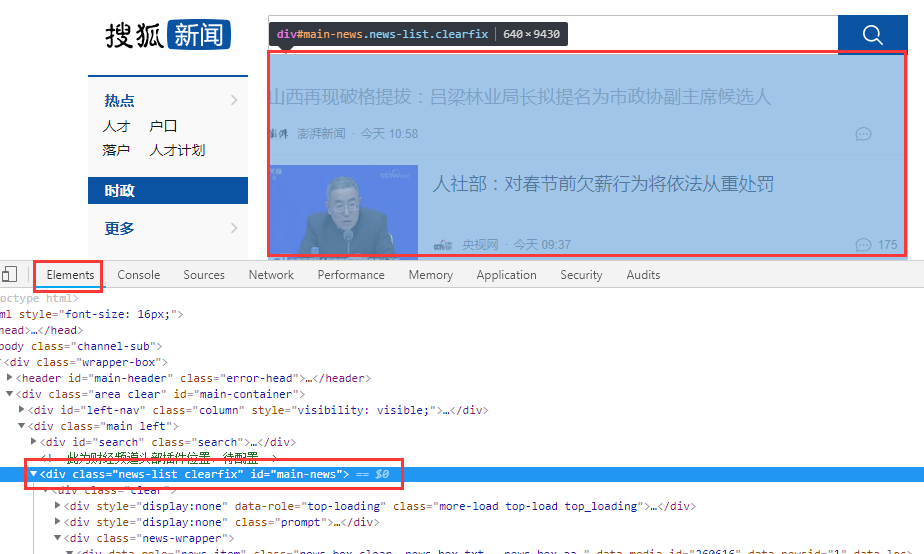
如上图,在谷歌浏览器,点击F12,在Elements选项卡中,找到网页中列表部分的,经查找,id为main-news的div标签下,有<h4> -> <a>中的href是文章的连接,通过bs4,获取<div id='main-news'>内部所有的<h4> <a>标签
使用css选择器方式搜索
import requests
from bs4 import BeautifulSoup

def main():
    '''
    访问首页,并抓取信息列表的链接
    '''
    global session
    session=requests.session()
    with session.get(url) as resp:
        if resp.status_code == 200:
            soup = BeautifulSoup(resp.text,"html.parser")
            #css选择器,返回list
            l=soup.select('#main-news h4 a')
            print(l)
结果为:
[<a href="//www.sohu.com/a/290547793_123753" target="_blank">
         2018年宁夏处分区管干部104人 追回外逃人员4人
        </a>, <a href="//www.sohu.com/a/290546935_114988" target="_blank">
         金隅集团20亿元公司债券明日上市
        </a>, <a href="//www.sohu.com/a/290551115_114731" target="_blank">福州地铁2号线将于5月1日前开通载客试运营</a>, <a href="//www.sohu.com/a/290536238_313745" target="_blank">
         阿拉伯经济峰会仅三国首脑出席,东道主黎巴嫩呼吁叙利亚难民回家
        </a>]
注意上面的超链接开头没有http:
3. 获取a标签的href属性
import requests
from bs4 import BeautifulSoup

def main():
    '''
    访问首页,并抓取信息列表的链接
    '''
    global session
    session=requests.session()
    with session.get(url) as resp:
        if resp.status_code == 200:
            soup = BeautifulSoup(resp.text,"html.parser")
            l=soup.select('#main-news h4 a')
            print(l)
    if l:
        for item in l:
            print(type(item),type(item['href']),item.get('href'))
            time.sleep(1) #休眠1秒钟,频繁快速访问服务器会被拒绝
            get_article('http:'+item.get('href'))#拼装http:
注意这里用到get_article()函数,但此时我们还没有定义该函数
4. 分析文章详细页面,抓取标题、内容
定义函数get_article(),传入文章详细页面的链接,通过requests向服务器发送请求,然后通过bs4分析网页,抓取标题、内容,并准备要下载内容中的图片,移除用不到的内容,将标题、内容写入到html中
如下:
def get_article(url):
    '''
    访问链接,分析出文章标题、内容、下载图片
    '''
    global session
    print("\n\n文章url",url)
    try:
        resp=session.get(url)
        if resp.status_code==200:
            soup = BeautifulSoup(resp.text,"html.parser")
            title=soup.select('h1')[0].text.strip()
            article=soup.select('article')[0]
            print('标题',title)
            # print('内容',article.prettify())
            article2=download_img(article) #下载文章内容中的图片
            article2.select('#backsohucom')[0].decompose() #移除返回
            article2.select('p[data-role="editor-name"]')[0].decompose() #移除责任编辑
            write_html(url[url.rfind('/')+1:],title,article2.prettify()) #将标题、内容写入html中
            # print('修改图片路径后的内容:',article)
            print('-'*20,'\n\n\n')
    except BaseException as e:
        raise
5. 下载文章内容的图片
传入文章内容,搜索出所有的<img>标签,根据src属性下载图片,下载到img文件夹中,同时还要修改文章内容<img>标签的src属性,让其指向本地的图片
def download_img(article):
    '''
    下载图片
    '''
    try:
        imgs=article.select('img')
        print('本文图片数量:',len(imgs))
        for item in imgs:
            url=item['src']
            print('图片url:',url)
            if not url.startswith('http:'):
                url='http:'+url
            name=url[url.rfind('/')+1:]
            resp=session.get(url)
            # 获取的数据是二进制的图片
            img = resp.content
            # 将图片数据写入本地文件
            with open( './img/'+name,'wb' ) as f:
                f.write(img)
            # 修改文章内容的img标签的src属性,指向本地图片
            item['src']='../img/'+name
    except BaseException as e:
        raise
6. 将标题、文章内容写入html
def write_html(filename,title,article):
    '''
    生成html
    '''
    with open('./html/'+filename+'.html','w',encoding='utf-8') as f:
        f.write(title)
        f.write('\n<br/>\n')
        f.write(article)
7. 访问下一页
在该网页中,采用了下拉加载数据,通过谷歌浏览器分析,我们得知,在下拉滚动条时,会发送链接关键字为feed的请求,参见下面截图: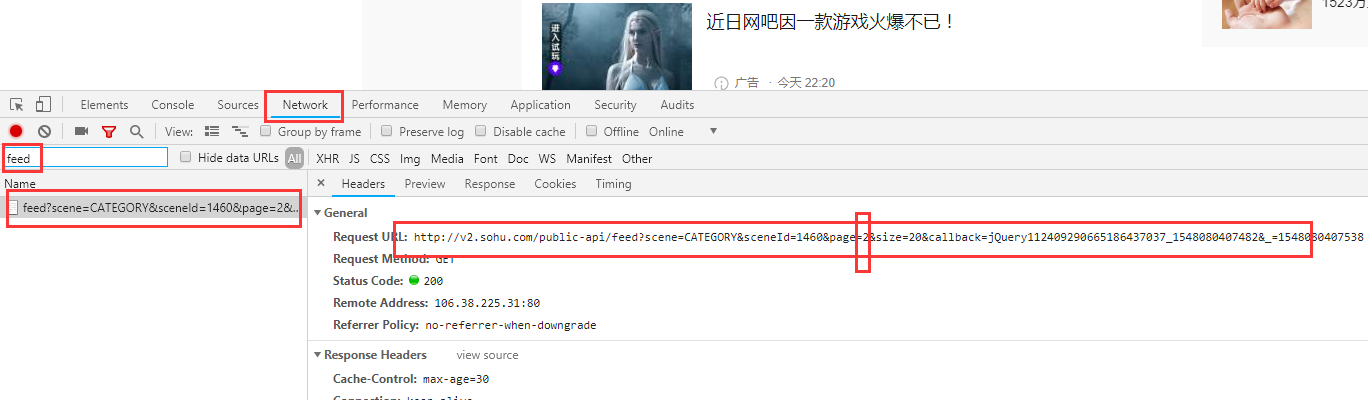
在上面链接中,page参数就是页码,从2开始
响应内容: 不是标准的json数据,需要做额外处理
代码如下:
url2='http://v2.sohu.com/public-api/feed?scene=CATEGORY&sceneId=1460&page=%d&size=20&callback=jQuery1124049905598042107147_1547826301316&_=1547826301366'
headers={
    'User-Agent': 'Mozilla/5.0 (Windows NT 6.3; Win64; x64) AppleWebKit/537.36 (KHTML, like Gecko) Chrome/70.0.3538.110 Safari/537.36'
    ,'Accept': '*/*'
    ,'Accept-Encoding': 'gzip, deflate'
    ,'Accept-Language': 'zh-CN,zh;q=0.9,en;q=0.8'
    ,'Connection': 'keep-alive'
    ,'Host': 'v2.sohu.com'
    ,'Referer': 'http://www.sohu.com/c/8/1460'
    ,'Cookie': 'SUV=180508174953J48I; gidinf=x099980109ee0dcaa6cfc80400002e3662edd8b4046d; beans_mz_userid=fybEf0w6qeeq; IPLOC=CN2200; reqtype=pc; t=1548041648603'
}

def next_page():
    '''
    访问下一页
    '''
    global session
    for item in range(2,30):
        time.sleep(1)
        try:
            print('\n\n获取第%d页列表-------------------------\n'%item)
            url=url2%item
            resp=session.get(url,headers=headers)
            if resp.status_code==200:
                text=resp.text
                # print(text[-1:])
                if text[-1:]!=';':
                    print(text)
                    print('内容不完整------------')
                    continue
                text=text[text.find('['):text.rfind(']')+1]
                print(text)
                j=json.loads(text)
                print('\n\n列表数量:',len(j))
                for d in j:
                    time.sleep(2)
                    print('\n\n',d['id'],d['authorId'])
                    get_article('http://www.sohu.com/a/%d_%d'%(d['id'],d['authorId']))
        except BaseException as e:
            raise
完整代码
#coding='utf-8'

import requests
from bs4 import BeautifulSoup
import time
import json


url='http://www.sohu.com/c/8/1460'
url2='http://v2.sohu.com/public-api/feed?scene=CATEGORY&sceneId=1460&page=%d&size=20&callback=jQuery1124049905598042107147_1547826301316&_=1547826301366'
headers={
    'User-Agent': 'Mozilla/5.0 (Windows NT 6.3; Win64; x64) AppleWebKit/537.36 (KHTML, like Gecko) Chrome/70.0.3538.110 Safari/537.36'
    ,'Accept': '*/*'
    ,'Accept-Encoding': 'gzip, deflate'
    ,'Accept-Language': 'zh-CN,zh;q=0.9,en;q=0.8'
    ,'Connection': 'keep-alive'
    ,'Host': 'v2.sohu.com'
    ,'Referer': 'http://www.sohu.com/c/8/1460'
    ,'Cookie': 'SUV=180508174953J48I; gidinf=x099980109ee0dcaa6cfc80400002e3662edd8b4046d; beans_mz_userid=fybEf0w6qeeq; IPLOC=CN2200; reqtype=pc; t=1548041648603'
}
session=None
def main():
    '''
    访问首页,并抓取信息列表的链接
    '''
    global session
    session=requests.session()
    with session.get(url) as resp:
        if resp.status_code == 200:
            soup = BeautifulSoup(resp.text,"html.parser")
            l=soup.select('#main-news h4 a')
            print(l)
    if l:
        for item in l:
            time.sleep(1)
            print(type(item),type(item['href']),item.get('href'))
            get_article('http:'+item.get('href'))

    next_page()

def get_article(url):
    '''
    访问链接,分析出文章标题、内容、下载图片
    '''
    global session
    print("\n\n文章url",url)
    try:
        resp=session.get(url)
        if resp.status_code==200:
            soup = BeautifulSoup(resp.text,"html.parser")
            title=soup.select('h1')[0].text.strip()
            article=soup.select('article')[0]
            print('标题',title)
            # print('内容',article.prettify())
            download_img(article)
            article2.select('#backsohucom')[0].decompose()
            article2.select('p[data-role="editor-name"]')[0].decompose()
            write_html(url[url.rfind('/')+1:],title,article2.prettify())
            # print('修改图片路径后的内容:',article)
            print('-'*20,'\n\n\n')
    except BaseException as e:
        raise

def write_html(filename,title,article):
    '''
    生成html
    '''
    with open('./html/'+filename+'.html','w',encoding='utf-8') as f:
        f.write(title)
        f.write('\n<br/>\n')
        f.write(article)

def download_img(article):
    '''
    下载图片
    '''
    try:
        imgs=article.select('img')
        print('本文图片数量:',len(imgs))
        for item in imgs:
            url=item['src']
            print('图片url:',url)
            if not url.startswith('http:'):
                url='http:'+url
            name=url[url.rfind('/')+1:]
            resp=session.get(url)
            # 获取的数据是二进制的图片
            img = resp.content
            # 将图片数据写入本地文件
            with open( './img/'+name,'wb' ) as f:
                f.write(img)
            # 修改文章内容的img标签的src属性,指向本地图片
            item['src']='../img/'+name
    except BaseException as e:
        raise

def next_page():
    '''
    访问下一页
    '''
    global session
    for item in range(2,30):
        time.sleep(1)
        try:
            print('\n\n获取第%d页列表-------------------------\n'%item)
            url=url2%item
            resp=session.get(url,headers=headers)
            if resp.status_code==200:
                text=resp.text
                # print(text[-1:])
                if text[-1:]!=';':
                    print(text)
                    print('内容不完整------------')
                    continue
                text=text[text.find('['):text.rfind(']')+1]
                print(text)
                j=json.loads(text)
                print('\n\n列表数量:',len(j))
                for d in j:
                    time.sleep(2)
                    print('\n\n',d['id'],d['authorId'])
                    get_article('http://www.sohu.com/a/%d_%d'%(d['id'],d['authorId']))
        except BaseException as e:
            raise

if __name__ == "__main__":
    main()