概述
java.io.FileInputStream类是文件输入流,是InputStream的子类,从文件中读取字节。
构造方法
FileInputStream(File file): 通过打开与实际文件的连接来创建一个 FileInputStream ,该文件由文件系统中的 File对象 file命名。FileInputStream(String name): 通过打开与实际文件的连接来创建一个 FileInputStream ,该文件由文件系统中的路径名 name命名。
必须传入文件路径。该路径下,如果没有该文件,会抛出FileNotFoundException 。
例子:
public class FileInputStreamConstructor throws IOException{
    public static void main(String[] args) {
            // 使用File对象创建流对象
        File file = new File("a.txt");
        FileInputStream fos = new FileInputStream(file);

        // 使用文件名称创建流对象
        FileInputStream fos = new FileInputStream("b.txt");
    }
}
读 操作
读一个字节
public int read() throws IOException
每次可以 读取一个字节 的数据,提升为int类型,读取到文件末尾,返回-1
使用较少,效率低
例子:
public class FISRead {
    public static void main(String[] args) throws IOException{
        // 使用文件名称创建流对象
        FileInputStream fis = new FileInputStream("read.txt");
        // 读取数据,返回一个字节
        int read = fis.read();
        System.out.println((char) read);
        read = fis.read();
        System.out.println((char) read);
        read = fis.read();
        System.out.println((char) read);
        read = fis.read();
        System.out.println((char) read);
        read = fis.read();
        System.out.println((char) read);
        // 读取到末尾,返回-1
        read = fis.read();
        System.out.println( read);
        // 关闭资源
        fis.close();
    }
}
输出结果:
a
b
c
d
e
-1
循环改进读取方式,代码使用演示:
FileInputStream fis=new FileInputStream("test.txt");
int n=fis.read();
while(n!=-1){
    System.out.print((char)n);
    n=fis.read();
}
fis.close()
或者
FileInputStream fis=new FileInputStream("test.txt");
int n=0;
while((n=fis.read())!=-1){
    System.out.print((char)n);
}
fis.close();
注意:
- 虽然读取了一个字节,但是会自动提升为int类型。
- 流操作完毕后,必须释放系统资源,调用close()方法
读 字节数组 (推荐)
public int read(byte b[]) throws IOException
定义一个长度是n的数组b,每次读取n个字节,并放入数组中
返回读取到的有效字节个数,读取到末尾时,返回-1
例子:
创建一个txt文件,内容为:abcde
FileInputStream fis=new FileInputStream("test.txt");
byte[] buf=new byte[2];
int n=0;
while((n=fis.read(buf))!=-1){
    System.out.print(new String(buf));
}
fis.close();
输出结果:
abcded
错误数据d,是由于最后一次读取时,只读取一个字节e,数组中,上次读取的数据没有被完全替换,所以要通过len ,获取有效的字节,代码使用演示:
FileInputStream fis=new FileInputStream("test.txt");
byte[] buf=new byte[2];
int n=0;
while((n=fis.read(buf))!=-1){
    System.out.print(new String(buf,0,n));
}
fis.close();
输出结果:
abcde
注意:
读 字节数组,每次读取多个字节,减少了系统间的IO操作次数,从而提高了读效率
读取文本文件(换行)
文件内容
a
b
123
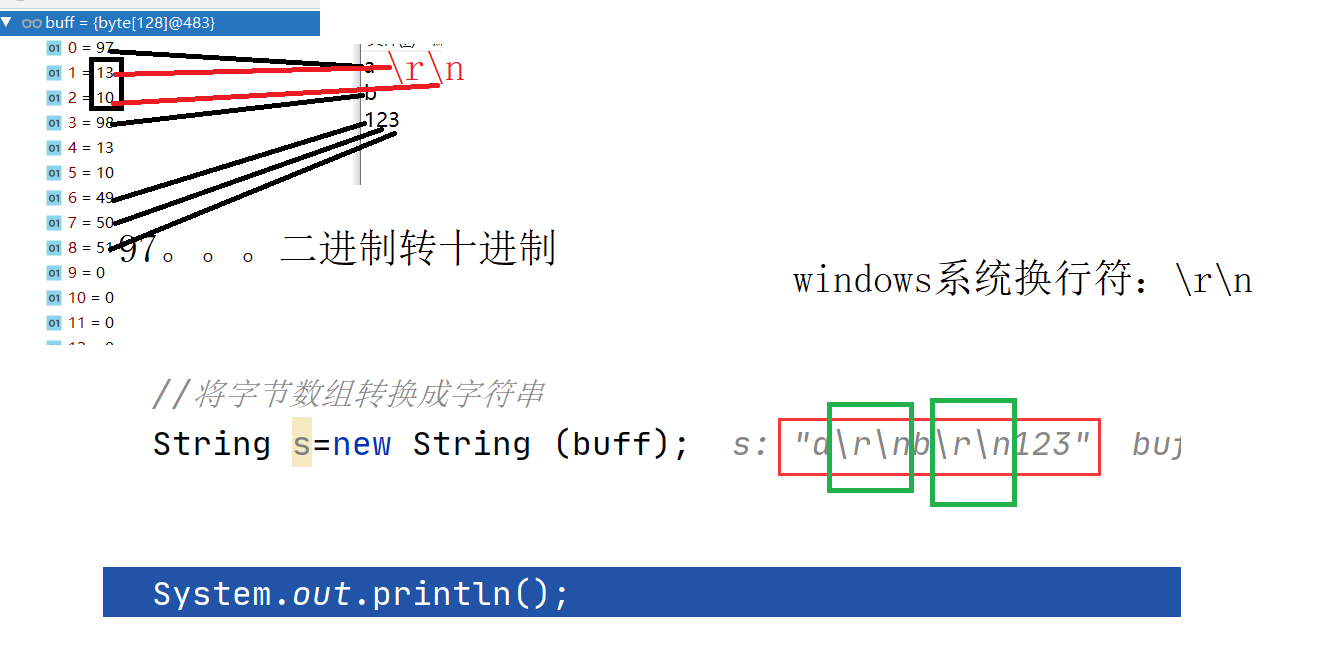
10 在ascii中表示换行键(windows特有)13 在ascii中表示回车键
练习
图片复制
public class Copy {
    public static void main(String[] args) throws IOException {
        // 1.创建流对象
        // 1.1 指定数据源
        FileInputStream fis = new FileInputStream("D:\\test.jpg");
        // 1.2 指定目的地
        FileOutputStream fos = new FileOutputStream("test_copy.jpg");

        // 2.读写数据
        // 2.1 定义数组
        byte[] b = new byte[1024];
        // 2.2 定义长度
        int len;
        // 2.3 循环读取
        while ((len = fis.read(b))!=-1) {
            // 2.4 写出数据
            fos.write(b, 0 , len);
        }

        // 3.关闭资源
        fos.close();
        fis.close();
    }
}
流的关闭原则:先开后关,后开先关。