创建工程

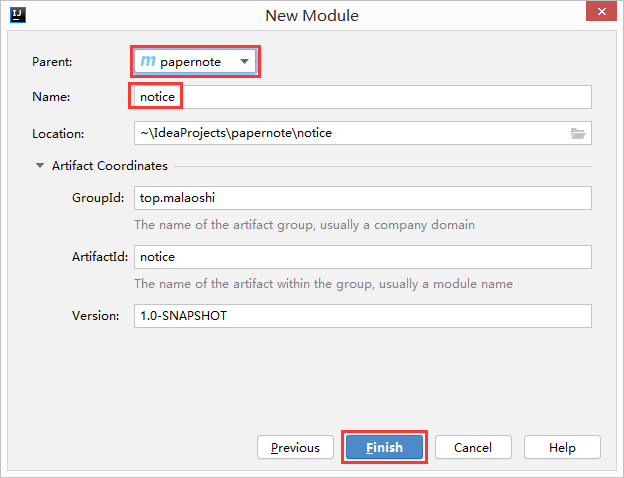
添加依赖pom.xml
<dependencies>
    <dependency>
        <groupId>com.alibaba.cloud</groupId>
        <artifactId>spring-cloud-starter-alibaba-nacos-discovery</artifactId>
    </dependency>
    <!-- springboot依赖,不写版本号表示继承父工程 -->
    <dependency>
        <groupId>org.springframework.boot</groupId>
        <artifactId>spring-boot-starter-web</artifactId>
    </dependency>
    <!-- springboot依赖 -->
    <dependency>
        <groupId>org.springframework.boot</groupId>
        <artifactId>spring-boot-starter-actuator</artifactId>
    </dependency>
    <!-- mybatis与springboot的整合 -->
<!--        <dependency>-->
<!--            <groupId>org.mybatis.spring.boot</groupId>-->
<!--            <artifactId>mybatis-spring-boot-starter</artifactId>-->
<!--        </dependency>-->
<!--        <dependency>-->
<!--            <groupId>com.alibaba</groupId>-->
<!--            <artifactId>druid-spring-boot-starter</artifactId>-->
<!--        </dependency>-->
    <!--mysql-connector-java-->
<!--        <dependency>-->
<!--            <groupId>mysql</groupId>-->
<!--            <artifactId>mysql-connector-java</artifactId>-->
<!--        </dependency>-->
    <!--jdbc-->
<!--        <dependency>-->
<!--            <groupId>org.springframework.boot</groupId>-->
<!--            <artifactId>spring-boot-starter-jdbc</artifactId>-->
<!--        </dependency>-->
    <dependency>
        <groupId>org.springframework.boot</groupId>
        <artifactId>spring-boot-devtools</artifactId>
        <scope>runtime</scope>
        <optional>true</optional>
    </dependency>
    <dependency>
        <groupId>org.projectlombok</groupId>
        <artifactId>lombok</artifactId>
        <optional>true</optional>
    </dependency>
    <dependency>
        <groupId>org.springframework.boot</groupId>
        <artifactId>spring-boot-starter-test</artifactId>
        <scope>test</scope>
    </dependency>
</dependencies>
application.yml配置文件
在resources文件夹中创建application.yml配置文件
server:
  port: 8081   # 服务端口
spring:
  application:
    name: notice-provider   # 注册服务名
  cloud:
    nacos:
      discovery:
        server-addr: 106.13.165.100:8848   # nacos地址
主启动类
package top.malaoshi;

import org.springframework.boot.SpringApplication;
import org.springframework.boot.autoconfigure.SpringBootApplication;
import org.springframework.cloud.client.discovery.EnableDiscoveryClient;

@SpringBootApplication
@EnableDiscoveryClient
public class NoticeMain {
    public static void main(String[] args) {
        SpringApplication.run(NoticeMain.class, args);
    }
}
controller
package top.malaoshi.controllers;

import org.springframework.web.bind.annotation.GetMapping;
import org.springframework.web.bind.annotation.PathVariable;
import org.springframework.web.bind.annotation.RestController;

@RestController
public class NoticeCtrl {

    @GetMapping(value = "/notice/{id}")
    public String notice(@PathVariable("id") String id) {
        return "通知成功! " + id;
    }

}
测试
测试服务
启动服务,访问 http://localhost:8081/notice/1 能够正常显示
测试nacos
登录nacos,在下面界面中可以看到注册的信息
