介绍
本案例通过 azkaban 执行任务,上传数据到 HDFS 上,调用 hive 客户端执行 SQL 分析数据
由于 hive 客户端只在 hadoop1 上部署,所以这里使用 单机模式
启动hadoop、hive
登录 hadoop1,执行下面命令:
cd /program/bin/
启动hadoop:
./hadoop.sh start
启动hive:
./hive.sh start
启动azkaban单机模式
登录 hadoop1,执行下面命令:
cd /program/azkaban-solo-server-3.81.0/
bin/start-solo.sh
目录树结构
/azkaban/
├── weibo_data
│   ├── 数据1.json
│   └── 数据12.json
├── weibo_job
│   ├── data_needs.job
│   ├── hive_table_hdfs_put.job
│   ├── sqoop.job
│   ├── udf.job
│   └── weibo.zip
└── weibo_sh
    ├── count_iphone.sql
    ├── data_needs.sh
    ├── hive_table_hdfs_put.sh
    ├── original-hive_weibo-1.0-SNAPSHOT.jar
    └── sum.sql
准备数据
详见 链接
上传
创建目录:
mkdir /azkaban/weibo_data -p
上传到 hadoop1 的 /azkaban/weibo_data/ 目录
编写脚本
创建目录
创建 /weibo_sh 目录
mkdir /azkaban/weibo_sh -p
cd /azkaban/weibo_sh
编写hive建表、上传数据脚本
创建脚本文件:
vim hive_table_hdfs_put.sh
内容如下:
#提示系统该文件为脚本文件
#!/bin/sh
echo "创建外部表"
#创建外部表(-S:为安静模式运行,不显示MapReduce状态)
hive -S -e 'CREATE EXTERNAL TABLE if not exists `weibo`(`json` string)COMMENT "This is the quova ASN source json table" LOCATION "/weibo";'

echo "上传数据"
#上传数据
hadoop fs -put /azkaban/weibo_data/* /weibo/
echo "完成"
编写 微博数据的统计分析 脚本
创建脚本文件:
vim data_needs.sh
内容如下:
#提示系统该文件为脚本文件
#!/bin/sh
echo "统计微博总量"
#统计微博总量
hive –S -e 'select count(*) from weibo;'

echo "独立用户数"
#独立用户数
hive –S -e 'select count(distinct(get_json_object(a.j,"$.userId"))) from (select substring(json,2,length(json)-2) as j from weibo) a;'

echo "统计用户所有微博被转发的总次数,并输出TOP-3"
#统计用户所有微博被转发的总次数,并输出TOP-3
hive –S -e 'select b.id,sum(b.cnt) as bsum from(select get_json_object(a.j,"$.userId") as id,get_json_object(a.j,"$.reportCount") as cnt from(select substring(json,2,length(json)-2) as j from weibo) a) b group by b.id order by bsum desc limit 3;'

echo "统计被转发次数最多的TOP-3微博,输出用户id"
#统计被转发次数最多的TOP-3微博,输出用户id
hive –S -e 'select get_json_object(a.j,"$.userId") as id, cast(get_json_object(a.j,"$.reportCount") AS INT) as cnt from (select substring(json,2,length(json)-2) as j from weibo) a order by cnt desc limit 3;'

echo "统计每个用户的发送微博总数,并存储到临时表"
#统计每个用户的发送微博总数,并存储到临时表
#创建临时表
hive –S -e 'create table weibo_uid_wbcnt(userid STRING, wbcnt INT) row format delimited fields terminated  by "\t";'
#统计每个用户的发送微博总数放到临时表中
hive –S -e 'insert overwrite table weibo_uid_wbcnt select get_json_object(a.j,"$.userId"),count(1) from (select substring(json,2,length(json)-2) as j from weibo) a group by get_json_object(a.j,"$.userId") ;'

echo "统计带图片的微博数"
#统计带图片的微博数
hive –S -e 'select count(*) from (select substring(json,2,length(json)-2) as j from weibo) a where get_json_object(a.j, "$.pic_list") like "%http%";'

echo "统计使用iphone发微博的独立用户数"
#统计使用iphone发微博的独立用户数
hive –S -e 'select count(distinct get_json_object(a.j,"$.userId")) from (select substring(json,2,length(json)-2) as j from weibo) a where lower(get_json_object(a.j,"$.source")) like "%iphone%";'

echo "统计微薄中评论次数小于1000的用户ID及数据来源,结果存入视图"
#统计微博中评论次数<1000的用户ID与数据来源信息,将其放入视图中
#创建视图
hive -S -e 'create view weibo_view as select get_json_object(a.j, "$.userId") as uid, get_json_object(a.j, "$.source") as source from (select substring(json, 2, length(json) - 2) as j from weibo) a;'
#统计视图中数据来源是“iPad客户端”的用户数目
hive -S -e 'select count(distinct(uid)) from weibo_view where source="iPad客户端";'
给以上脚本授权
chmod +x *.sh
编写 hive UDF 函数
详见链接:
https://www.malaoshi.top/show_1GW2MhjD8got.html
编写 SQL
/azkaban/weibo_sh
编写sum.sql
实现将微博的点赞人数与转发人数相加求和,并将相加之和降序排列,取前10条记录需要执行的hive sql语句
创建文件:
vim sum.sql
内容如下:
注意: 注释不要用 #,要用 --,否则 hive3 会报错
-- 用于向hive中添加自定义jar
add jar /azkaban/weibo_sh/original-hive_weibo-1.0-SNAPSHOT.jar;
-- 创建hive临时函数
create temporary function wb as 'top.malaoshi.weibo.udf.Sum';
-- 查询微博的点赞人数与转发人数相加求和,并将相加之和降序排列,取前10条记录
select wb(cast(get_json_object(a.j,'$.praiseCount') as int),cast(get_json_object(a.j,'$.reportCount')as int)) as cnt from (select substring(json,2,length(json)-2) as j from weibo) a order by cnt desc limit 10;
测试
调用 hive客户端 执行该脚本,测试是否成功:
hive -S -f /azkaban/weibo_sh/sum.sql
编写count_iphone.sql
统计微博内容中出现 “iphone” 次数最多的用户,最终结果输出用户ID和次数前10行
vim count_iphone.sql
文件内容:
注意: 注释不要用 #,要用 --,否则 hive3 会报错
--用于向hive中添加自定义jar
add jar /azkaban/weibo_sh/original-hive_weibo-1.0-SNAPSHOT.jar;
--创建hive临时函数
create temporary function wcount as 'top.malaoshi.weibo.udf.Count';
--统计微博内容中出现“北京”次数最多的用户,最终结果输出用户ID和次数,取前10行
select b.id,sum(b.cnt) as cn from (select get_json_object(a.j,'$.userId')as id, wcount(get_json_object(a.j,'$.content'),'北京') as cnt from (select substr(json,2,length(json)-2) as j from weibo) a)b group by b.id order by cn desc limit 10;
测试
调用 hive客户端 执行该脚本,测试是否成功:
hive -S -f /azkaban/weibo_sh/count_iphone.sql
编写 azkaban 任务文件
创建目录
cd /azkaban/
mkdir weibo_job
cd /azkaban/weibo_job/
hive_table_hdfs_put
vim hive_table_hdfs_put.job
内容:
type=command
#执行hive建表及上传数据脚本
command=/azkaban/weibo_sh/hive_table_hdfs_put.sh
data_needs
vim data_needs.job
内容:
type=command
#执行微博统计分析脚本
command=/azkaban/weibo_sh/data_needs.sh
#依赖于hive_table_hdfs_put执行
dependencies=hive_table_hdfs_put
udf
vim udf.job
内容:
type=command
#执行udf求点赞人数与转发人数和并查询的sql文件
# “-f”:可以执行一个sql文件,并且文件中包含多条hive sql语句
command=hive -S -f /azkaban/weibo_sh/sum.sql
#执行统计微博内容中出现“iphone”次数最多的用户并查询sql
command.1=hive -S -f /azkaban/weibo_sh/count_iphone.sql
#依赖于data_needs执行
dependencies=data_needs
sqoop
vim sqoop.job
内容:
type=command
command=mysql -uroot -proot -e 'drop database if exists weibo;'
#在mysql数据库中创建weibo数据库
command.1=mysql -uroot -proot -e 'create database weibo;'
#创建weibo表
command.2=mysql -uroot -proot -e 'create table weibo.weibo(userid varchar(255) ,wbcnt int(11) )ENGINE=InnoDB DEFAULT CHARSET=utf8;'
#将统计每个用户的发送微博总数,并存储到临时表的数据导到mysql
command.3=/program/sqoop-1.4.7/bin/sqoop export --connect jdbc:mysql://hadoop1:3306/weibo --username root --password root --table weibo --export-dir '/user/hive/warehouse/weibo_uid_wbcnt'  --input-fields-terminated-by '\t'
#依赖于udf执行
dependencies=udf
将任务文件打包
zip -r weibo.zip data_needs.job hive_table_hdfs_put.job sqoop.job udf.job
azkaban web网页操作
打开浏览器,输入网址: http://hadoop1:8081 敲回车
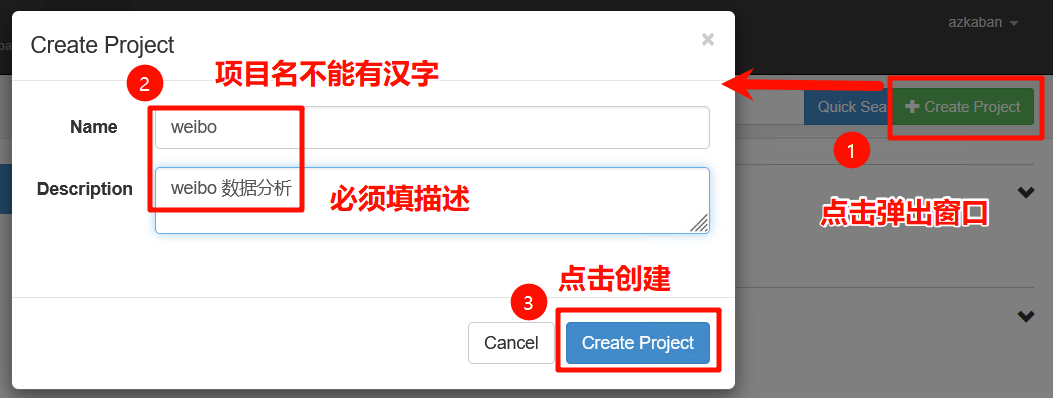
创建工程

输入项目名、描述,如下图:

执行
如下图:

立即执行,如下图:

执行结果


hive_table_hdfs_put
点击任务对应的【log】,查看详细过程,如下图:

data_needs
点击任务对应的【log】,查看详细过程,如下图:

udf
点击任务对应的【log】,查看详细过程,如下图:

sqoop
点击任务对应的【log】,查看详细过程,如下图:

查询MySQL数据:
登录 hadoop1 服务器:
执行下面命令,登录 MySQL:
mysql -uroot -proot
查询表:
select * from weibo.weibo;
