提出问题
传统 Socket 编程,是阻塞模式,需要创建一个线程处理一个连接,线程间的切换开销很大,且每个线程都要占用系统资源(如:内存)
当并发量特别大,需要创建 特别多的线程时,就性能低下
解决
使用 nio socket 编程
nio socket
nio 网络编程,支持 阻塞模式 和 非阻塞模式
非阻塞模式下,可以用 一个线程,处理多个客户端连接,如:调用 read() 读取数据,如果发现没数据已经到达,就会立刻返回 -1
channel
相关的channel:
ServerSocketChannel,相当于ServerSocket,用于TCP server端SocketChannel,相当于 Socket,用于TCP 客户端
Selector
详见 java nio Socket网络编程-Selector
与bio的不同
bio:读写是 阻塞 的,必须为每个连接 创建一个线程。每个线程都需要占用内存
nio:当有读写事件发生时,才会进行读写。避免多线程 之间的上下文切换导致的开销
实现步骤
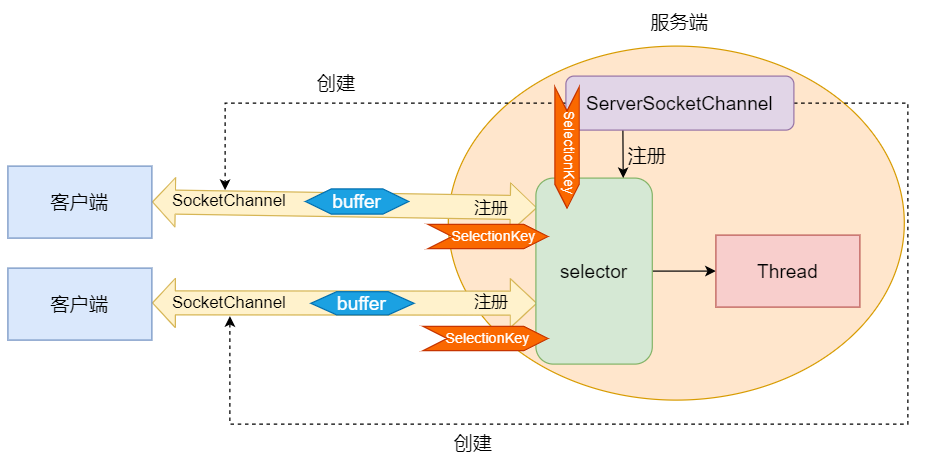
- 创建 ServerSocketChannel,设置 非阻塞模式
- 创建 Selector 对象,将 ServerSocketChannel 注册到 Selector中,监听
OP_ACCEPT事件 - 循环调用
Selector.select()方法,调用该方法会一直阻塞,当注册的事件发生时,才会返回 - 得到 SelectionKey 对象,通过该对象 获得 与 事件 关联的 channel
- 如果是
OP_ACCEPT事件,就通过 该channel建立 与客户端连接的 SocketChannel,需要设置 非阻塞模式,然后注册到 Selector中,监听OP_READ事件 - 如果是
OP_READ事件,通过 该channel读取数据 - 删除 SelectionKey 对象,否则会重复操作
与操作系统
java nio socket 的底层,是依赖操作系统的,在 linux、unix中,是通过 epoll 实现的
bug
java nio socket 提高了性能,但也使编程变得更复杂,而且本身也有bug:
在NIO中通过Selector的轮询当前是否有IO事件,根据JDK NIO api描述,Selector的select方法会一直阻塞,直到IO事件达到或超时,但是在Linux平台上这里有时会出现问题,在某些场景下select方法会直接返回,即使没有超时并且也没有IO事件到达,这就是著名的epoll bug,这是一个比较严重的bug,它会导致线程陷入死循环,会让CPU飙到100%,极大地影响系统的可靠性,到目前为止,JDK都没有完全解决这个问题。
解决
使用 netty 框架
代码
server
package stdnio;

import java.io.IOException;
import java.net.InetSocketAddress;
import java.nio.ByteBuffer;
import java.nio.channels.SelectionKey;
import java.nio.channels.Selector;
import java.nio.channels.ServerSocketChannel;
import java.nio.channels.SocketChannel;
import java.util.Iterator;

public class Server {
    //通道管理器
    private Selector selector;

    /**
     * 获得一个ServerSocket通道,并对该通道做一些初始化的工作
     * @param port  绑定的端口号
     * @throws IOException
     */
    public void initServer(int port) throws IOException {
        // 获得一个ServerSocket通道
        ServerSocketChannel serverChannel = ServerSocketChannel.open();
        // 设置通道为非阻塞
        serverChannel.configureBlocking(false);
        // 将该通道对应的ServerSocket绑定到port端口
        serverChannel.socket().bind(new InetSocketAddress(port));
        // 获得一个通道管理器
        this.selector = Selector.open();
        //将通道管理器和该通道绑定,并为该通道注册SelectionKey.OP_ACCEPT事件,注册该事件后,
        //当该事件到达时,selector.select()会返回,如果该事件没到达selector.select()会一直阻塞。
        serverChannel.register(selector, SelectionKey.OP_ACCEPT);
    }

    /**
     * 采用轮询的方式监听selector上是否有需要处理的事件,如果有,则进行处理
     * @throws IOException
     */
    public void listen() throws IOException {
        System.out.println("服务端启动成功!");
        // 轮询访问selector
        while (true) {
            //当注册的事件到达时,方法返回;否则,该方法会一直阻塞
            selector.select();
            // 获得selector中选中的项的迭代器,选中的项为注册的事件
            Iterator ite = this.selector.selectedKeys().iterator();
            while (ite.hasNext()) {
                SelectionKey key = (SelectionKey) ite.next();
                // 删除已选的key,以防重复处理
                ite.remove();
                // 客户端请求连接事件
                if (key.isAcceptable()) {
                    ServerSocketChannel server = (ServerSocketChannel) key
                            .channel();
                    // 获得和客户端连接的通道
                    SocketChannel channel = server.accept();
                    // 设置成非阻塞
                    channel.configureBlocking(false);

                    //在这里可以给客户端发送信息
                    channel.write(ByteBuffer.wrap("你好,客户端!".getBytes("utf-8")));
                    //在和客户端连接成功之后,为了可以接收到客户端的信息,需要给通道设置读的权限。
                    channel.register(this.selector, SelectionKey.OP_READ);


                } else if (key.isReadable()) {// 获得了可读的事件
                    read(key);
                }

            }

        }
    }
    /**
     * 处理读取服务端发来的信息 的事件
     * @param key
     * @throws IOException
     */
    public void read(SelectionKey key) throws IOException{
        // 服务器可读取消息:得到事件发生的Socket通道
        SocketChannel channel = (SocketChannel) key.channel();
        // 创建读取的缓冲区
        ByteBuffer buffer = ByteBuffer.allocate(1024);
        channel.read(buffer);
        byte[] data = buffer.array();
        String msg = new String(data,"utf-8").trim();
        System.out.println("客户端收到信息:"+msg);
//        ByteBuffer outBuffer = ByteBuffer.wrap(msg.getBytes());
//        channel.write(outBuffer);// 将消息回送给客户端
    }

    /**
     * 启动服务端测试
     * @throws IOException
     */
    public static void main(String[] args) throws IOException {
        Server server = new Server();
        server.initServer(8000);
        server.listen();
    }
}
客户端
package stdnio;
import java.io.IOException;
import java.net.InetSocketAddress;
import java.nio.ByteBuffer;
import java.nio.channels.SelectionKey;
import java.nio.channels.Selector;
import java.nio.channels.SocketChannel;
import java.util.Iterator;
public class Client {
    //通道管理器
    private Selector selector;

    /**
     * 获得一个Socket通道,并对该通道做一些初始化的工作
     * @param ip 连接的服务器的ip
     * @param port  连接的服务器的端口号
     * @throws IOException
     */
    public void initClient(String ip,int port) throws IOException {
        // 获得一个Socket通道
        SocketChannel channel = SocketChannel.open();
        // 设置通道为非阻塞
        channel.configureBlocking(false);
        // 获得一个通道管理器
        this.selector = Selector.open();

        // 客户端连接服务器,其实方法执行并没有实现连接,需要在listen()方法中调
        //用channel.finishConnect();才能完成连接
        channel.connect(new InetSocketAddress(ip,port));
        //将通道管理器和该通道绑定,并为该通道注册SelectionKey.OP_CONNECT事件,注册该事件后,
        //当该事件到达时,selector.select()会返回,如果该事件没到达selector.select()会一直阻塞。
        channel.register(selector, SelectionKey.OP_CONNECT);
    }

    /**
     * 采用轮询的方式监听selector上是否有需要处理的事件,如果有,则进行处理
     * @throws IOException
     */
    @SuppressWarnings("unchecked")
    public void listen() throws IOException {
        // 轮询访问selector
        while (true) {
            // 选择一组可以进行I/O操作的事件,放在selector中,该方法会阻塞
            selector.select();
            // 获得selector中选中的项的迭代器
            Iterator ite = this.selector.selectedKeys().iterator();
            while (ite.hasNext()) {
                SelectionKey key = (SelectionKey) ite.next();
                // 删除已选的key,以防重复处理
                ite.remove();
                // 连接事件发生
                if (key.isConnectable()) {
                    SocketChannel channel = (SocketChannel) key
                            .channel();
                    // 如果正在连接,则完成连接
                    if(channel.isConnectionPending()){
                        channel.finishConnect();

                    }
                    // 设置成非阻塞
                    channel.configureBlocking(false);

                    //在这里可以给服务端发送信息哦
                    channel.write(ByteBuffer.wrap("你好,服务器".getBytes("utf-8")));
                    //在和服务端连接成功之后,为了可以接收到服务端的信息,需要给通道设置读的权限。
                    channel.register(this.selector, SelectionKey.OP_READ);

                    // 获得了可读的事件
                } else if (key.isReadable()) {
                    read(key);
                }

            }

        }
    }
    /**
     * 处理读取服务端发来的信息 的事件
     * @param key
     * @throws IOException
     */
    public void read(SelectionKey key) throws IOException{
        // 服务器可读取消息:得到事件发生的Socket通道
        SocketChannel channel = (SocketChannel) key.channel();
        // 创建读取的缓冲区
        ByteBuffer buffer = ByteBuffer.allocate(1024);
        channel.read(buffer);
        byte[] data = buffer.array();
        String msg = new String(data,"utf-8").trim();
        System.out.println("客户端收到信息:"+msg);
//        ByteBuffer outBuffer = ByteBuffer.wrap(msg.getBytes());
//        channel.write(outBuffer);// 将消息回送给客户端
    }


    /**
     * 启动客户端测试
     * @throws IOException
     */
    public static void main(String[] args) throws IOException {
        Client client = new Client();
        client.initClient("localhost",8000);
        client.listen();
    }
}