文档
文档 相当于mysql表中的一行记录
创建文档方式一
相当于mysql中的 insert 语句,向一个表插入记录
保存一个数据,要指定 索引 和 类型,在 toutiao 索引下的 _doc 类型下数据:
POST /toutiao/_doc
{
    "title": "JAVA从入门到放弃",
    "content": "JAVA高手的技巧,java基础、高级",
    "author":"李雷",
    "like":229,
    "date":"2021-08-30"
}
执行结果:
{
    "_index": "toutiao",     //索引相当于mysql的数据库,保存到toutiao数据库
    "_type": "_doc",         //类型
    "_id": "pGcmlnsBRQ4q0pqf1bII",    //id
    "_version": 1,           //版本号是1
    "result": "created",     //结果:创建成功
    "_shards": {             //分片
        "total": 2,
        "successful": 1,
        "failed": 0
    },
    "_seq_no": 0,
    "_primary_term": 1
}
查询所有文档
GET /toutiao/_search
再次执行
数据不变,再次执行,结果如下:
{
    "_index": "toutiao",
    "_type": "_doc",
    "_id": "WWdIlnsBRQ4q0pqf9ra0",    //id改变了
    "_version": 1,
    "result": "created",
    "_shards": {
        "total": 2,
        "successful": 1,
        "failed": 0
    },
    "_seq_no": 0,
    "_primary_term": 1
}
不能发 PUT 请求
提示 只能发送 POST请求,因为 PUT 请求 要求幂等性
{
    "error": "Incorrect HTTP method for uri [/toutiao/_doc] and method [PUT], allowed: [POST]",
    "status": 405
}
创建文档方式二(传id)
相当于mysql中的 insert 语句,向一个表插入记录,并且指定 id
保存数据,指定 toutiao 索引下的 _doc 类型,保存id是 1 的数据:
提示:如果有该主键,就是修改数据
POST /toutiao/_doc/1
{
    "title": "mysql从入门到放弃",
    "content": "mysql技术内幕",
    "author":"李雷",
    "like":300,
    "date":"2021-08-29"
}
执行结果:
{
    "_index": "toutiao",  //索引相当于mysql的数据库,保存到 toutiao 数据库
    "_type": "_doc",   //类型
    "_id": "1",                //id
    "_version": 1,            //版本号是1
    "result": "created",    //结果:创建成功
    "_shards": {            //分片
        "total": 2,
        "successful": 1,
        "failed": 0
    },
    "_seq_no": 0,
    "_primary_term": 1
}
查看所有文档:
GET /toutiao/_search
查看所有文档
https://www.malaoshi.top/show_1IX1m646ONAE.html
查看文档 根据id
GET /toutiao/_doc/1
执行结果如下:
{
    "_index": "toutiao",
    "_type": "_doc",
    "_id": "1",
    "_version": 4,
    "_seq_no": 7,
    "_primary_term": 2,
    "found": true,  // 说明查询到数据
    "_source": {
        "title": "mysql从入门到放弃",
        "content": "mysql技术内幕",
        "author":"李雷",
        "like":510,
        "date":"2021-08-29"
    }
}
查看 id不存在的文档
发送请求:
GET /toutiao/_doc/adfwefawef
返回结果如下:
{
    "_index": "toutiao",
    "_type": "_doc",
    "_id": "adfwefawef",
    "found": false            //说明没有找到数据
}
修改文档
POST 覆盖修改(传id)
相当于mysql中的 update 语句,根据 id 修改记录
保存数据,指定 toutiao 索引下的 _doc 类型,指定id是 1 ,如果 数据库中有 id是 1 的记录,那么该记录就会 被修改
POST /toutiao/_doc/1
{
    "title": "mysql从入门到放弃2222222",
    "content": "mysql技术内幕",
    "author":"李雷",
    "like":510,
    "date":"2021-08-29"
}
再次执行,结果如下:
{
    "_index": "toutiao",
    "_type": "_doc",
    "_id": "1",
    "_version": 2,            //版本号是2
    "result": "updated",    //结果:更新
    "_shards": {
        "total": 2,
        "successful": 1,
        "failed": 0
    },
    "_seq_no": 1,
    "_primary_term": 1
}
查看所有文档:
GET /toutiao/_search
PUT 全部修改
因为 指定了 id,发送的请求 符合幂等性,所以可以使用 PUT 请求
PUT /toutiao/_doc/1
{
    "title": "mysql从入门到放弃2222222",
    "content": "mysql技术内幕",
    "author":"李雷",
    "like":510,
    "date":"2021-08-29"
}
查看所有文档:
GET /toutiao/_search
注意:不要这么修改
修改指定字段
PUT /toutiao/_doc/1
{
    "title": "java 连接 mysql从入门到精通 下"
}
查询
get /toutiao/_doc/1
执行结果:
{
  "_index" : "toutiao",
  "_type" : "_doc",
  "_id" : "1",
  "_version" : 12,
  "_seq_no" : 26,
  "_primary_term" : 1,
  "found" : true,
  "_source" : {
    "title" : "java 连接 mysql从入门到精通 下" // 只修改该字段,其他字段全删除了
  }
}
PUT 部分修改
POST /toutiao/_update/1
{
    "doc":{
        "title": "mysql从入门到放弃44444"
    }

}
执行结果:
{
    "_index": "toutiao",
    "_type": "_doc",
    "_id": "1",
    "_version": 5,          //版本号加1
    "result": "updated",    //结果:更新
    "_shards": {
        "total": 2,
        "successful": 1,
        "failed": 0
    },
    "_seq_no": 8,
    "_primary_term": 2
}
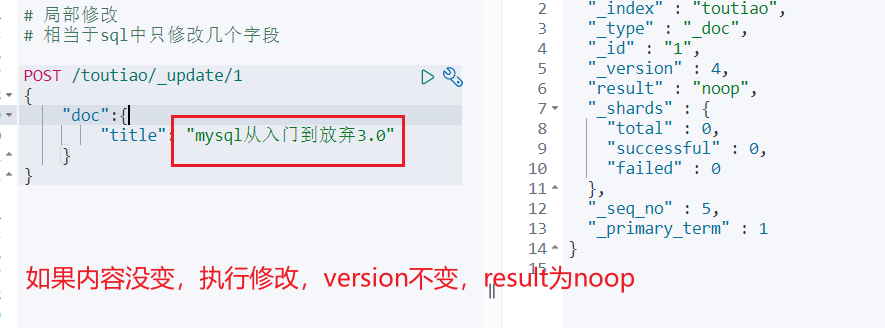
内容不变,再次修改
如果内容没变,执行修改,version 不变,result 为 noop
post 与 put 相同
删除(指定id)
DELETE /blog/_doc/1
执行结果如下:
{
    "_index": "blog",
    "_type": "_doc",
    "_id": "1",
    "_version": 6,
    "result": "deleted",    //结果:删除
    "_shards": {
        "total": 2,
        "successful": 1,
        "failed": 0
    },
    "_seq_no": 9,
    "_primary_term": 2
}
再次执行
执行结果如下:
{
    "_index": "toutiao",
    "_type": "_doc",
    "_id": "1",
    "_version": 1,
    "result": "not_found",        //记录不存在
    "_shards": {
        "total": 2,
        "successful": 1,
        "failed": 0
    },
    "_seq_no": 10,
    "_primary_term": 2
}