说明
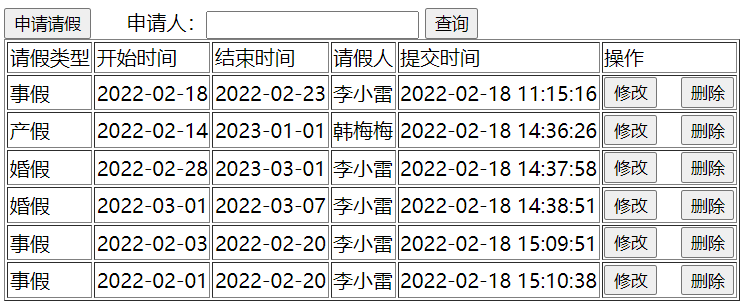
效果图如下:
html
<!DOCTYPE html>
<html lang="en">
<head>
<meta charset="UTF-8">
<meta http-equiv="X-UA-Compatible" content="IE=edge">
<meta name="viewport" content="width=device-width, initial-scale=1.0">
<script src="js/vue.js"></script>
<script src="js/axios.js"></script>
<title>Document</title>
</head>
<body>
<div id="app">
<button @click="qingjia_vue">申请请假</button>
申请人:<input type="text" v-model="applicant" > <button @click="search">查询</button>
<table border="1">
<tr>
<td>请假类型</td>
<td>开始时间</td>
<td>结束时间</td>
<td>请假人</td>
<td>提交时间</td>
<td>操作</td>
</tr>
<tr v-for="item in leaves" :key="item.l_id">
<td>{{item.l_type_text}}</td>
<td>{{item.start_date}}</td>
<td>{{item.end_date}}</td>
<td>{{item.real_name}}</td>
<td>{{item.create_time}}</td>
<td>
<button @click="showById(item.l_id)">修改</button>
<button @click="del(item.l_id)">删除</button></td>
</tr>
</table>
</div>
<script>
//new Vue() 相当于java创建对象
var app = new Vue({
el: '#app', //el是element缩写
data: { //是vue的配置,表示数据
leaves: [],
applicant:""
},
methods:{
del(id){ //简写
var b=confirm("您确定要删除该条记录吗?")
if(!b){
return;
}
console.log("点击删除按钮,id是:"+id)
axios.get('delLeave?id='+id, {
})
.then(function (res) {
console.log("删除结果:",res.data);
if(res.data.code===0){//删除成功
this.search()
}
})
.catch(function (error) {// 请求失败处理
console.log(error);
});
},
qingjia:function(){ // 全写,更能看清是json结构
location.href="leave2.html"
},
qingjia_vue:function(){ // 全写,更能看清是json结构
location.href="leave_vue.html"
},
search:function(){
console.log("点击查询按钮",this.applicant)
let params = new URLSearchParams();
params.append("leaveUser", this.applicant);
var that = this
axios.post('leaveList', params)
.then(function (res) {
console.log(res.data);
// 在 axios 中,要访问 vue的leaves
// 在 axios 中,获取不到 vue对象,为了解决这个问题,就有了 var that = this
// 为什么 不这么写: this.leaves,因为 在 axios块中,this表示axios
that.leaves=res.data.data
})
.catch(function (error) {// 请求失败处理
console.log(error);
});
},
showById:function(id){
console.log("id:",id)
//通过url传参数
location.href="leaveDetail.html?id="+id
}
},
mounted:function(){ // vue挂载完成后,发送ajax请求
this.search() // 挂载vue之后,显示数据之前,调用 search()
}
})
</script>
</body>
</html>
返回json
{
    "code":0,
    "data":[
        {
            "end_date":"2022-02-23",
            "l_type":"1",
            "create_time":"2022-02-18 11:15:16",
            "user_id":"1",
            "real_name":"李小雷",
            "l_id":32,
            "l_type_text":"事假",
            "start_date":"2022-02-18"
        },
        {
            "end_date":"2023-01-01",
            "l_type":"3",
            "create_time":"2022-02-18 14:36:26",
            "user_id":"2",
            "real_name":"韩梅梅",
            "l_id":33,
            "l_type_text":"产假",
            "start_date":"2022-02-14"
        },
        {
            "end_date":"2023-03-01",
            "l_type":"4",
            "create_time":"2022-02-18 14:37:58",
            "user_id":"1",
            "real_name":"李小雷",
            "l_id":34,
            "l_type_text":"婚假",
            "start_date":"2022-02-28"
        },
        {
            "end_date":"2022-03-07",
            "l_type":"4",
            "create_time":"2022-02-18 14:38:51",
            "user_id":"1",
            "real_name":"李小雷",
            "l_id":35,
            "l_type_text":"婚假",
            "start_date":"2022-03-01"
        },
        {
            "end_date":"2022-02-20",
            "l_type":"1",
            "create_time":"2022-02-18 15:09:51",
            "user_id":"1",
            "real_name":"李小雷",
            "l_id":37,
            "l_type_text":"事假",
            "start_date":"2022-02-03"
        },
        {
            "end_date":"2022-02-20",
            "l_type":"1",
            "create_time":"2022-02-18 15:10:38",
            "user_id":"1",
            "real_name":"李小雷",
            "l_id":38,
            "l_type_text":"事假",
            "start_date":"2022-02-01"
        }
    ]
}