说明
事件冒泡(bubble),子元素的事件被触发时,其 父元素 的相同事件也会被触发
事件捕获,子元素的事件被触发时,自父元素捕获至子元素(同一事件)
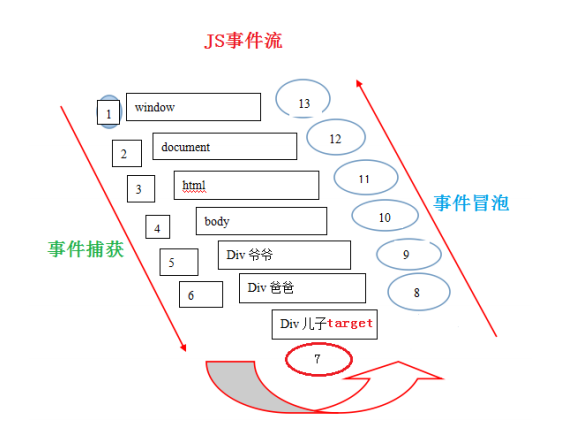
案例
- 定义
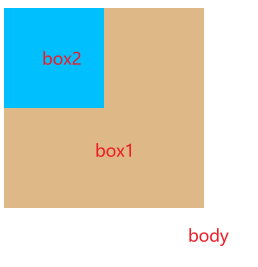
div,id是box1 - 在 id是
box1的内部,定义div,id是box2 - 给
box1、box2、body加上点击事件
如下图:
css样式:
<style>
    #box1{
        background-color: burlywood;
        width: 500px;
        height: 500px;
    }
    #box2{
        background-color:deepskyblue;
        width: 300px;
        height: 300px;
    }
</style>
body内容:
<div id="box1">
    <div id="box2"></div>
</div>
<script>
    window.onload = function(){
        var box1 = document.getElementById("box1")
        var box2 = document.getElementById("box2")

        box1.onclick = function(){
            console.log("box1")
        }
        box2.onclick = function(){
            console.log("box2")
        }
        document.body.onclick = function(){
            console.log("body")
        }
    }
</script>
测试
当点击
box2时,box2、box1、body的点击事件都会触发当点击
box1时,box1、body的点击事件都会触发
提示:以下事件不冒泡
blur、focus、load、unload
阻止事件冒泡
在上面的案例中,当点击 box2 时,只想触发 box2 的点击事件,不想触发 box1、body 的点击事件
此时就需要通过 box2 的 事件对象 取消 事件冒泡
关键代码
box2.onclick = function(event){
    // 获取事件对象
    var event = event || window.event
    if(document.all){  //只有ie识别
        e.cancelBubble=true; //阻止事件冒泡,IE 识别,后来其他浏览器也支持
    }else{
        e.stopPropagation(); //阻止事件冒泡,符合w3c标准,IE不识别
    }
    console.log("box2")
}
通过 event.cancelBubble = true 取消 事件冒泡,当点击 box2 时,只想触发 box2 的点击事件,不再触发 box1、body 的点击事件
点击 box1 时,box1、body 的点击事件都会触发
事件捕获
需要用到 addEventListener 方式绑定事件,第三个参数是 true,表示捕获阶段,触发事件
详见:
https://www.malaoshi.top/show_1IX1HrZV1dq2.html
例子
验证捕获顺序,从父元素到子元素
样式:
<style>
    #box1{
        background-color: burlywood;
        width: 200px;
        height: 200px;
    }
    #box2{
        background-color:deepskyblue;
        width: 100px;
        height: 100px;
    }
</style>
body内容:
<div id="box1">
    <div id="box2"></div>
</div>
<script>
    window.onload = function(){
        var box1 = document.getElementById("box1")
        var box2 = document.getElementById("box2")
        // 注意第三个参数是true,表示捕获阶段触发事件
        box1.addEventListener("click", function(){
            console.log("box1")
        },true)
        box2.addEventListener("click",function(event){
            // 获取事件对象
            var event = event || window.event
            // 取消事件冒泡
            // event.cancelBubble = true
            console.log("box2")
        },true)
        document.body.addEventListener("click", function(){
            console.log("body")
        },true)
    }
</script>
扩展
同时实现捕获、冒泡
案例
css样式
<style>
    #box1{
        background-color: burlywood;
        width: 200px;
        height: 200px;
    }
    #box2{
        background-color:deepskyblue;
        width: 100px;
        height: 100px;
    }
</style>
body部分
<div id="box1">
    <div id="box2"></div>
</div>
<script>
    window.onload = function(){
        var box1 = document.getElementById("box1")
        var box2 = document.getElementById("box2")

        box1.addEventListener("click", function(){
            console.log("冒泡:box1")
        })
        box2.addEventListener("click",function(event){
            console.log("冒泡:box2")
        })
        document.body.addEventListener("click", function(){
            console.log("冒泡:body")
        })

        box1.addEventListener("click", function(){
            console.log("捕获:box1")
        },true)
        box2.addEventListener("click",function(event){
            console.log("捕获:box2")
        },true)
        document.body.addEventListener("click", function(){
            console.log("捕获:body")
        },true)
    }
</script>
执行结果:
捕获:body
捕获:box1
捕获:box2
冒泡:box2
冒泡:box1
冒泡:body
可知:先捕获、后冒泡