概述
本文分析 spring boot 启动
主启动类:
@SpringBootApplication
public class Main {
    public static void main(String[] args) {
        SpringApplication.run(Main.class,args);
    }
}
主启动类很简单,@SpringBootApplication 注解很重要
@SpringBootApplication
由该注解修饰的类,是springboot的主配置类
SpringApplication.run(Main.class,args); 中第一个参数,必须是 主配置类,即:必须由 @SpringBootApplication 修饰
源码
@Target({ElementType.TYPE})
@Retention(RetentionPolicy.RUNTIME)
@Documented
@Inherited
@SpringBootConfiguration
@EnableAutoConfiguration
@ComponentScan(
    excludeFilters = {@Filter(
    type = FilterType.CUSTOM,
    classes = {TypeExcludeFilter.class}
), @Filter(
    type = FilterType.CUSTOM,
    classes = {AutoConfigurationExcludeFilter.class}
)}
)
public @interface SpringBootApplication {
说明
@SpringBootConfiguration:该注解修饰的类,是springboot配置类-
开启自动配置。原来需要手动配置的部分,现在由springboot自动配置
自动加载 主配置类 所在包下(含子包)所有类的注解。
容易出现的错误
如果 Controller 类,不在 主配置类 所在的包下(也不在子包下),那么在启动时,springboot 无法加载该类,即:该类不起作用
如下图,主启动类 Main 在 top.malaoshi 下
启动时,主启动类 Main 只 加载 top.malaoshi 包下(含子包) 的所有类的注解。DemoController 类在 demo 包下,不会被 主启动类加载,所以 DemoController 不起作用
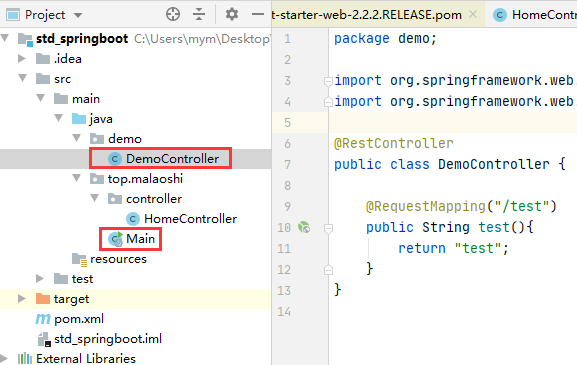
访问:http://localhost:8080/test 提示报错
解决错误
把 DemoController 类,移动到 top.malaoshi 包下(含子包),重新启动,就可以正常访问