说明
z-index 属性设置元素的堆叠顺序
z-index属性值:整数,默认值为 0,值大越靠前
注意:
z-index:可以是负数z-index:在定位元素上生效,即有position属性
例子
实现下图效果:
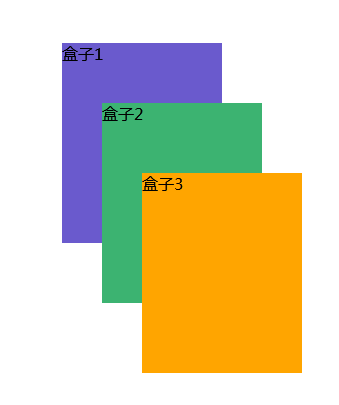
<!DOCTYPE html>
<html>
    <head>
        <meta charset="utf-8">
        <title></title>
        <style>
            .box1{
                width: 160px;
                height: 200px;
                background-color: SlateBlue;
                position: fixed;
                left: 160px;
                top:90px;
            }
            .box2{
                width: 160px;
                height: 200px;
                background-color:MediumSeaGreen;
                position: fixed;
                left: 200px;
                top:150px;
                z-index:500;
            }
            .box3{
                width: 160px;
                height: 200px;
                background-color: Orange;
                position: fixed;
                left: 240px;
                top:220px;
                z-index:1000; /*值越大,越靠前*/
            }
        </style>
    </head>
    <body>
        <div class="box1">盒子1</div>
        <div class="box2">盒子2</div>
        <div class="box3">盒子3</div>
    </body>
</html>