提出问题
通过之前的的学习:
已经能够利用Deployment来创建一组Pod来提供高可用的服务。
每个Pod都会分配一个单独的 IP,但存在以下问题:
问题1:Pod IP 仅仅是集群内可见的虚拟IP,只有 k8s 服务器通过 pod 的 ip 能够访问服务,其他计算机无法访问
问题2:Pod IP 会随着Pod的重建产生变化
验证问题1
创建pod
kubectl run nginx --image=nginx:latest --port=80 --replicas=3 -n test2
查看pod ip
kubectl get pod -n test2 -o wide
显示如下:
NAME                    READY   STATUS    RESTARTS   AGE   IP            NODE    NOMINATED NODE   READINESS GATES
nginx-dd6b5d745-g5rz4   1/1     Running   0          22s   10.244.1.16   node1   <none>           <none>
nginx-dd6b5d745-rtwcw   1/1     Running   0          22s   10.244.2.8    node2   <none>           <none>
nginx-dd6b5d745-w645m   1/1     Running   0          22s   10.244.1.17   node1   <none>           <none>
访问pod
只能在 master 或 node 服务器中,通过 pod 的 IP 访问
在 master 或 node 服务器,执行下面命令:
curl 10.244.1.16
显示如下:
<!DOCTYPE html>
<html>
<head>
<title>Welcome to nginx!</title>
<style>
html { color-scheme: light dark; }
body { width: 35em; margin: 0 auto;
font-family: Tahoma, Verdana, Arial, sans-serif; }
</style>
</head>
<body>
<h1>Welcome to nginx!</h1>
<p>If you see this page, the nginx web server is successfully installed and
working. Further configuration is required.</p>

<p>For online documentation and support please refer to
<a href="http://nginx.org/">nginx.org</a>.<br/>
Commercial support is available at
<a href="http://nginx.com/">nginx.com</a>.</p>

<p><em>Thank you for using nginx.</em></p>
</body>
</html>
结论
只能在 master 或 node 服务器中,通过 pod 的 IP 访问,不能通过 master 或 node 服务器的 ip 访问,即:其他计算机无法访问
验证问题2
删除 pod 后,pod控制器会重建 pod,此时 pod 的 ip 发生改变
kubectl delete pod nginx-dd6b5d745-g5rz4 -n test2
再次查看 pod 的ip:
kubectl get pod -n test2 -o wide
显示如下:
NAME                    READY   STATUS    RESTARTS   AGE     IP            NODE    NOMINATED NODE   READINESS GATES
nginx-dd6b5d745-92h8n   1/1     Running   0          56s     10.244.1.18   node1   <none>           <none>
nginx-dd6b5d745-rtwcw   1/1     Running   0          6m51s   10.244.2.8    node2   <none>           <none>
nginx-dd6b5d745-w645m   1/1     Running   0          6m51s   10.244.1.17   node1   <none>           <none>
结论
能够看出,pod 的 ip 发生改变,其他程序要想访问该服务,也需要改 ip,这是不合理的
解决
通过 Service 解决
Service介绍
Service可以看作是一组同类Pod 对外的访问接口
借助Service,应用可以方便地实现 服务发现 和 负载均衡
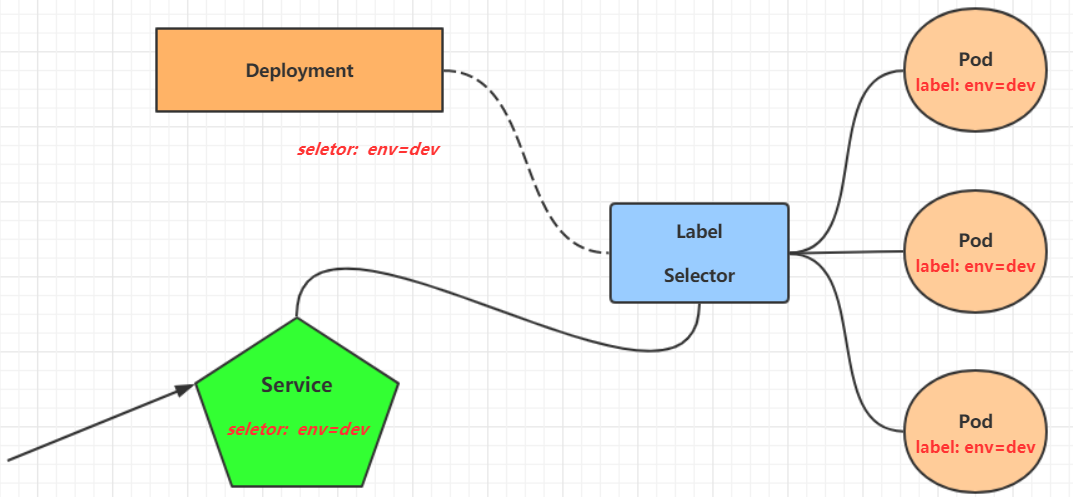
- 外部程序通过 Service 访问 pod
- Service 与 pod 是通过 label 建立关系的