说明
绘制矩形,有以下函数:
fillRect(x, y, width, height)
绘制一个填充的矩形strokeRect(x, y, width, height)
绘制一个矩形的边框clearRect(x, y, width, height)
清除指定矩形区域,让清除部分完全透明。
参数解释:
x 与 y 指定了在 canvas 画布上所绘制的矩形的左上角(相对于原点)的坐标
width 和 height 设置矩形的尺寸
例子
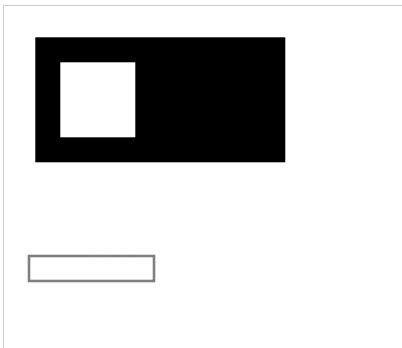
<canvas width="400" height="400" style="border: 1px solid #ccc;"></canvas>

<script>
    const canvas = document.querySelector("canvas");
    const ctx = canvas.getContext('2d');
    // 在 (25,25) 的位置,用黑色填充 宽度200、高度是100的矩形
    ctx.fillRect(25, 25, 200, 100);
    // 在上面矩形中,清空出一个正方形(透明色),位置(45,45),宽度60,高度60
    ctx.clearRect(45, 45, 60, 60);
    // 在 (20,300) 的位置绘制边框是黑色,宽度100、高度20的矩形
    ctx.strokeRect(20, 200, 100, 20);

</script>