说明
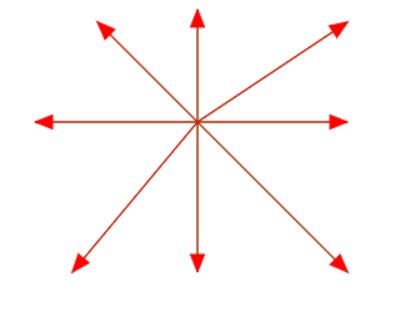
传入直线 起点坐标、终点坐标,可以绘制箭头直线,如下图:
思路
(关键)根据直线的起点、终点,计算弧度(注意:不是角度),详见:链接
(关键) 平移到起点位置,并进行旋转,目的是:可以按照水平向右的直线一样进行操作
绘制直线、箭头
代码
<canvas id="canvasId" width="1000" height="1000" style="border: 1px solid #ccc;"></canvas>

<script>
    const canvas = document.getElementById("canvasId");
    const ctx = canvas.getContext('2d');

    const getArrowWidth = (strokeWidth)=>{
              // 向右箭头的水平宽度
              return strokeWidth * 2 + 8
    }
    /**
     * 绘制带有箭头的直线
     * @param cavParam canvas画布变量
     * @param fromX/fromY 起点坐标
     * @param toX/toY 终点坐标
     * @param color 线与箭头颜色
     **/
    function drawLineArrow(ctx, fromX, fromY, toX, toY, color,strokeWidth) {

        // 直线的宽高,用于计算直线长度、弧度
        const height = Math.abs(fromY - toY)
        const width = Math.abs(fromX - toX)
        // console.log("width:",width,",height:",height)
        // 箭头直线长度(直线长度+向右箭头的水平宽度)
        const length = Math.sqrt(height * height + width * width)
        // 箭头线与直线的弧度,对边除以邻边
        let radian = calcRadian(fromX, fromY, toX, toY,)

        // 箭头线与直线的夹角
        // var theta = radian * (180 / Math.PI);
        // 箭头线与直线的夹角
        // console.log("theta:",theta,",radian:",radian)


        // 向右箭头的水平宽度
        const widthArrow = getArrowWidth(strokeWidth)
        // 直线的长度(去掉箭头的水平宽度)
        // const lengthLine = length - widthArrow

        // 测试:画原始直线
        //ctx.beginPath()
        //ctx.moveTo(fromX, fromY );
        //ctx.lineTo( toX, toY);
        //ctx.strokeStyle = 'green';
        //ctx.stroke();

        // 为了方便计算,平移到fromX,fromY点,并进行旋转,然后直线起点是 (0,0),并且可按照水平向右的方向计算

        ctx.beginPath()
        // 箭头直线
        ctx.save()
        // 移动的起点
        ctx.translate(fromX, fromY)
        ctx.rotate(radian) //弧度

        //画直线(此时直线水平向右)
        ctx.moveTo(0,0);
        ctx.lineTo( length, 0);
        // 绘制箭头
        drawArrow(ctx,strokeWidth,length)
        ctx.strokeStyle = color;
        ctx.stroke();
        ctx.restore()
        ctx.fillStyle = color
        ctx.fill()
    }
    /**
     * 传入起点、终点,计算弧度
     * @param {Object} fromX
     * @param {Object} fromY
     * @param {Object} toX
     * @param {Object} toY
     */
    function calcRadian(fromX, fromY, toX, toY){
        // 直线的宽高
        const height = Math.abs(fromY - toY)
        const width = Math.abs(fromX - toX)
        let radian = 0
        if(toX > fromX && toY == fromY){ // 第一、四象限,直线水平向右
            radian = 0
            // console.log("第一、四象限,直线水平向右")
        }else if(toX == fromX && toY < fromY){ // 第一、二象限,直线垂直向上
            radian = -Math.PI/2
            // console.log("第一、二象限,直线垂直向上")
        }else if(toX < fromX && toY == fromY){ //第二、三象限,水平向左的箭头直线
            // console.log("第二、三象限,水平向左的箭头直线")
            radian = Math.PI
        }else if(toX == fromX && toY > fromY){ //第三、四象限,垂直向下的箭头直线
            // console.log("第三、四象限,垂直向下的箭头直线")
            radian = Math.PI/2
        }else if(toX > fromX && toY < fromY){
            // 适用与第一象限
            radian = - Math.atan( height / width )
            // console.log("第一象限")
        }else if(toX < fromX && toY < fromY){
            // radian = Math.atan( width / height )
            // 适用与第二象限
            radian = Math.PI + Math.atan( height / width )
            // console.log("第二象限")
        }else if(toX < fromX && toY > fromY){
            // radian = Math.atan( width / height )
            // 适用与第三象限
            radian = Math.PI  -   Math.atan( height / width )
            // console.log("第三象限")
        }else if(toX > fromX && toY > fromY){
            // radian = Math.atan( width / height )
            // 适用与第四象限
            radian = Math.atan( height / width )
            // console.log("第四象限")
        }
        return radian
    }
    /**
     * @param {Object} ctx
     * @param {Object} strokeWidth
     * @param {Object} length 直线长度
     */
    function drawArrow(ctx,strokeWidth,length){
        // console.log("strokeWidth,length,x2::",strokeWidth,length,x2)
          // 向右箭头的垂直高度
          const heightArrow = strokeWidth * 2 + 5

          // 向右箭头的水平宽度
          const widthArrow = getArrowWidth(strokeWidth)
          // console.log("widthArrow:",widthArrow)

          // 直线的长度
          const lengthLine = length - widthArrow

          // 向右箭头,右点位置
          const rightArrow = [length , 0]
          // console.log("lengthLine:",lengthLine)
          // 上点位置
          const topArrow = [ lengthLine , -heightArrow/2]
          // 下点位置
          const bottomArrow = [lengthLine,heightArrow/2]


          ctx.moveTo(rightArrow[0],rightArrow[1])
          // console.log(rightArrow[0],rightArrow[1])
          ctx.lineTo(topArrow[0],topArrow[1])
          ctx.lineTo(bottomArrow[0],bottomArrow[1])
          ctx.closePath()


    }

    // 第一象限的箭头直线
    drawLineArrow(ctx, 250, 100, 370, 20, "red",3);
    // 第二象限的箭头直线
    drawLineArrow(ctx, 250, 100, 170, 20, "red",3);
    // 第三项限的箭头直线
    drawLineArrow(ctx, 250, 100, 150, 220, "red",3);
    // 第四象限的箭头直线
    drawLineArrow(ctx, 250, 100, 370, 220, "red",3);


    // 第一、四象限,水平向右的箭头直线
    drawLineArrow(ctx, 250, 100, 370, 100, "red",3);
    // 第一、二象限,垂直向上
    drawLineArrow(ctx, 250, 100, 250, 10, "red",3);
    // 第二、三象限,水平向左的箭头直线
    drawLineArrow(ctx, 250, 100, 120, 100, "red",3);
    // 第三、四象限,垂直向下的箭头直线
    drawLineArrow(ctx, 250, 100, 250, 220, "red",3);


    // ctx.beginPath()
    // ctx.fillRect( 10,10,100,50)
</script>