说明
可用下面方法获取 div 的坐标、宽度、高度
元素.getBoundingClientRect()
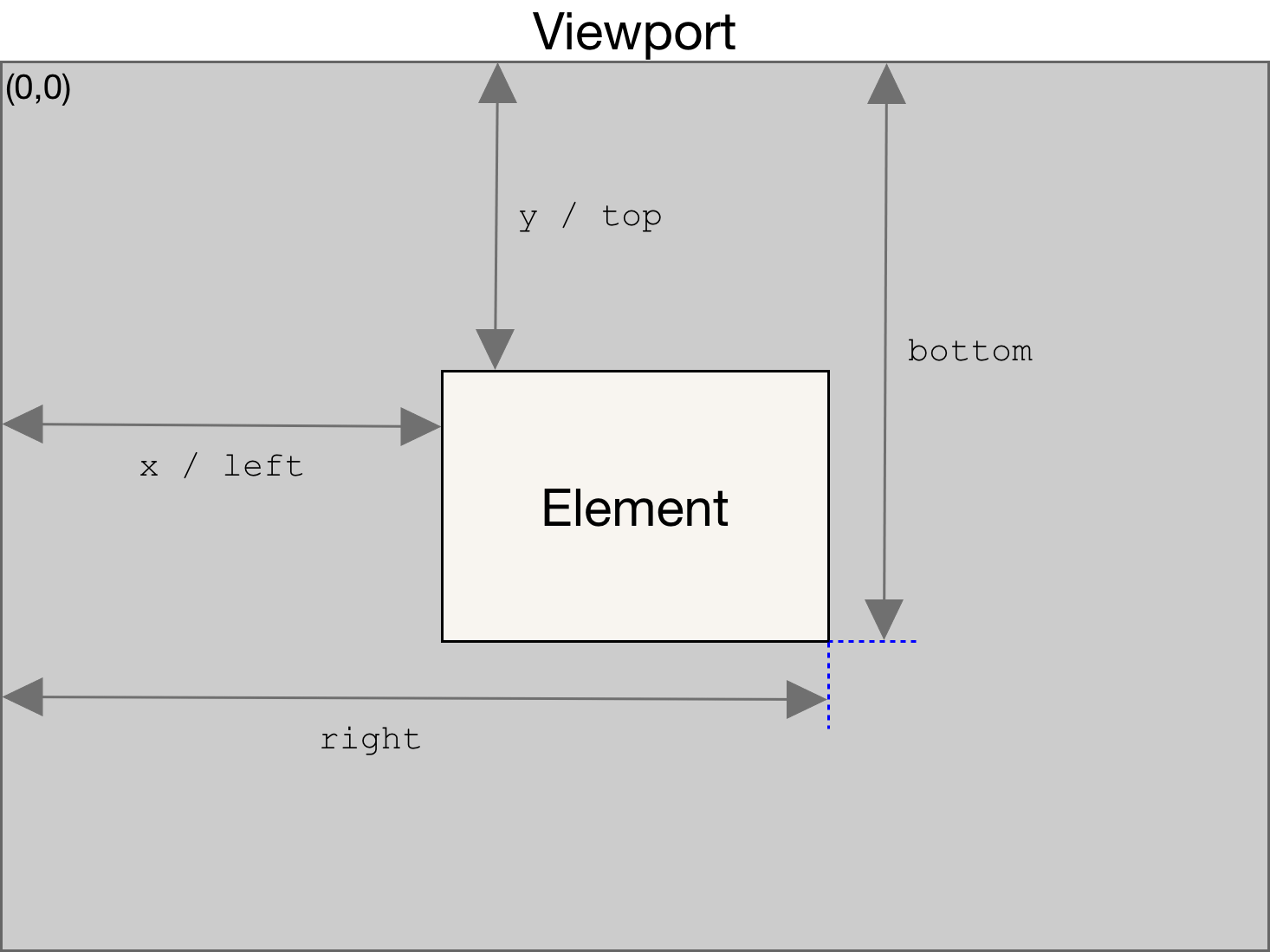
返回值:
是一个 DOMRect 对象,是包含整个元素的最小矩形(包括 padding 和 border-width)。该对象有以下属性:
- left:参见上图
- top:参见上图,是元素左上角到浏览器顶部可视区域的距离,如果往上滚动了,滚动距离忽略
- right:参见上图
- bottom:参见上图
- x:见 left
- y:见 top
- width:元素的宽度,包含:padding 和 border
- height:元素的高度,包含:padding 和 border
例子
const square = document.getElementsByName("square")
const rect = square.getBoundingClientRect()
console.log(rect)
执行结果:
bottom: 178.79999923706055
height: 120
left: 183.8000030517578
right: 188.8000030517578
top: 58.79999923706055
width: 5
x: 183.8000030517578
y: 58.79999923706055
参考:
https://developer.mozilla.org/zh-CN/docs/Web/API/Element/getBoundingClientRect
https://blog.csdn.net/weixin_61597234/article/details/134878221