作用
url 和 处理方法 之间的映射关系
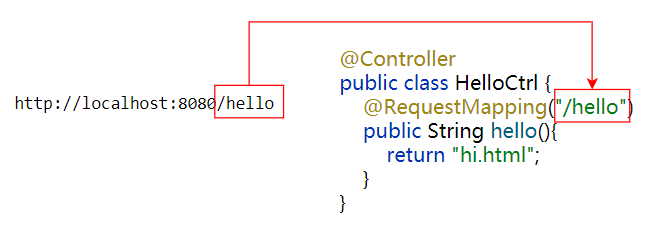
源码
@Target({ElementType.METHOD, ElementType.TYPE})
@Retention(RetentionPolicy.RUNTIME)
@Documented
@Mapping
public @interface RequestMapping {
    String name() default "";

    @AliasFor("path")
    String[] value() default {};

    @AliasFor("value")
    String[] path() default {};

    RequestMethod[] method() default {};

    String[] params() default {};

    String[] headers() default {};

    String[] consumes() default {};

    String[] produces() default {};
}
value 属性
@AliasFor("path")
String[] value() default {};
映射路径,可以是数组
例子
value可以省略,如:@RequestMapping("/save")可以是数组,如:
@RequestMapping({"/save","/add"})
匹配上下文(context)后面的部分
@RequestMapping("/save") 中的 /save,匹配的是 http://ip:port/context/save
也就是说:@RequestMapping("/save") 开头中的 / ,指上下文(context)后面的 /
注意: 这与 .html 文件中的超链接不同,超链接 <a href='/hi.html'>超链接</a> 中的 /,指 http://ip:port/ 端口号后面的 /
path 属性
@AliasFor("value")
String[] path() default {};
同value,映射路径,可以是数组
例子:
path不能省略,如:@RequestMapping(path="/save")可以是数组,如:
@RequestMapping(path={"/save","/add"})
可以声明 类、方法上
@Target({ElementType.METHOD, ElementType.TYPE}) 表示该注解可以声明 类、方法 上
例子
比如开发学生管理系统,那么肯定有学生的增删改查功能,如下:
@Controller
public class StudentCtrl {

    @RequestMapping("/student/save")
    public String save(){
        return "saveSuccess";
    }

    @RequestMapping("/student/update")
    public String update(){
        return "updateSuccess";
    }

    @RequestMapping("/student/delete")
    public String delete(){
        return "deleteSuccess";
    }

    @RequestMapping("/student/query")
    public String query(){
        return "result";
    }
}
这是会发现有共同的映射路径:/student ,这时就可以提取出来,声明到类上,改造如下:
@Controller
@RequestMapping("/student")
public class StudentCtrl {

    @RequestMapping("/save")
    public String save(){
        return "saveSuccess";
    }

    @RequestMapping("/update")
    public String update(){
        return "updateSuccess";
    }

    @RequestMapping("/delete")
    public String delete(){
        return "deleteSuccess";
    }

    @RequestMapping("/query")
    public String query(){
        return "result";
    }
}
method 属性
RequestMethod[] method() default {};
指定处理某种请求方法
http常见方法:GET(查)、POST(增)、PUT(改)、DELETE(删))
这些方法定义在 RequestMethod 类中
注意: 如果 没有配置该属性,表示 支持所有方法
例子1
@RequestMapping(value = "/save",method = RequestMethod.POST) ,只能处理 post 请求,其他方法的请求,会报错
例子2
可以是数组,如:@RequestMapping(value = "/hello",method = {RequestMethod.GET,RequestMethod.POST}),只能处理 get、post 请求,其他方法的请求,会报错
consumes
指定处理请求的提交内容类型(Content-Type),如:application/json, text/html;
例子
下面方法仅处理 Content-Type为 application/json 类型的请求
@RequestMapping(value = "/addStudent", method = RequestMethod.POST, consumes = MediaType.APPLICATION_JSON_VALUE)
public void addStudent(@RequestBody Student student) {

}
produces
指定 返回的数据类型,仅当request请求头中的(Accept)类型中包含该指定类型才返回;
例子1
返回json数据,此时等同于 @ResponseBody,如下:
@RequestMapping(value = "/getById", ,produces= MediaType.APPLICATION_JSON_VALUE)
public Student getById(String petId) {

}
例子2
返回json数据,并设置字符编码为 utf-8,如下:
@RequestMapping(value = "/getById", ,produces= MediaType.APPLICATION_JSON_VALUE+";charset=utf-8")
public Student getById(String petId) {

}
参考:
https://blog.csdn.net/jaryle/article/details/72965885
https://blog.csdn.net/kongkongyanan/article/details/106011293