Ansible教程:setup模块收集 Facts 事实变量 作者:马育民 • 2026-09-27 16:15 • 阅读:10000 # 介绍 `ansible.builtin.setup` 是内置事实收集模块,作用是采集远程主机系统信息(称为 **facts**),采集的数据存入 `ansible_facts` 变量,供playbook模板、判断条件使用。 ### playbook默认配置 - 默认 `gather_facts: true` 会**自动执行setup** - 关闭 `gather_facts` 后,可以手动调用 `setup` 模块采集事实 # 参数 | 参数 | 说明 | 示例 | |---|---|---| | `filter` | 过滤器,只输出匹配的fact,支持通配符`*` | `filter: ansible_os_*` | | `gather_subset` | 采集子集,控制收集哪一类信息,可加`!`排除 | `min,network,hardware` | | `fact_path` | 自定义facts目录路径(远程主机上`.fact`文件目录) | `/etc/ansible/facts.d` | ### gather_subset 可选值 - `all`:收集全部facts(默认) - `min`:最小基础信息(主机名、os、内核) - `hardware`:硬件信息(CPU、内存、磁盘) - `network`:网卡、IP、路由 - `virtual`:虚拟化信息(虚拟机/宿主机) - `ohai` / `facter`:集成ohai/facter工具采集 - `!xxx`:排除某类子集 - `!all`:只收集min最小集 - `!all,!min`:不收集任何系统事实(仅自定义fact) # Ad-hoc命令使用setup模块 常用于查看被控机信息 ### 收集目标主机全部facts ```bash ansible web -m setup -i ansible_client.ini ``` ### 只过滤操作系统相关信息 ``` ansible web -m setup -a "filter=ansible_os_*" -i ansible_client.ini ``` ### 仅收集最小基础信息,减少执行耗时 ``` ansible web -m setup -a "gather_subset=min" -i ansible_client.ini ``` ### 只收集网络+硬件信息,排除其余 ``` ansible web -m setup -a 'gather_subset=network,hardware,!virtual' -i ansible_client.ini ``` # 常用内置Facts变量 ### 新写法1:字典写法 python字典写法,支持所有facts变量名 | 变量 | 含义 | 示例 | |---|---|---| | ansible_facts['distribution'] | 操作系统发行版 | CentOS / Ubuntu / Debian / RedHat | | ansible_facts['distribution_major_version'] | 系统主版本 | 7 / 8 / 22 | | ansible_facts['distribution_version'] | 完整版本号 | 7.9 / 22.04 | | ansible_facts['os_family'] | 系统家族 | RedHat / Debian / Suse / Darwin | | ansible_facts['architecture'] | 系统架构 | x86_64 / aarch64 | | ansible_facts['kernel'] | 内核版本 | 5.15.0 | | ansible_facts['hostname'] | 短主机名 | web01 | | ansible_facts['fqdn'] | 完整FQDN域名 | web01.example.com | | ansible_facts['default_ipv4']['address'] | 默认网卡IPv4 | 192.168.1.10 | | ansible_facts['all_ipv4_addresses'] | 所有IPv4地址数组 | ["10.0.0.1","192.168.1.10"] | | ansible_facts['memtotal_mb'] | 总内存MB | 16384 | | ansible_facts['processor_vcpus'] | CPU逻辑核数 | 8 | | ansible_facts['pkg_mgr'] | 包管理器 | yum / dnf / apt | | ansible_facts['service_mgr'] | 服务管理器 | systemd / sysvinit | | ansible_facts['mounts'] | 磁盘挂载信息 | 数组,包含各分区容量 | | ansible_facts['env'] | 系统环境变量 | ansible_facts['env']['PATH'] | ### 新写法2:使用 `.` 上面写法可以改用 `.`,如:`ansible_facts.distribution` **注意:** 如果facts事实变量名中有 `-`,则不支持 ### 旧写法(不推荐) 旧扁平变量写法,如:`ansible_distribution` # Playbook使用setup模块 ### 打印所有facts 创建 playbook 文件: ``` nano playbook_facts.yml ``` 内容: ```yaml --- - name: 打印所有facts hosts: all tasks: - name: 输出ansible_facts debug: var: ansible_facts ``` 执行: ``` ansible-playbook playbook_facts.yml -C -i ansible_client.ini ``` ### 使用指定的facts事实变量(最常用) 创建 playbook: ``` nano playbook_setup模块.yml ``` 内容: ```yaml --- - name: 自动收集主机facts hosts: web gather_facts: true # play开头自动执行setup tasks: - name: 打印操作系统名称 debug: msg: "操作系统: {{ ansible_facts.os_family }}" - name: 判断系统,不同系统执行不同动作 when: ansible_facts.os_family == "RedHat" debug: msg: "这是RHEL/CentOS系列主机" ``` 模拟执行: ``` ansible-playbook playbook_setup模块.yml -C -i ansible_client.ini ``` 执行结果: [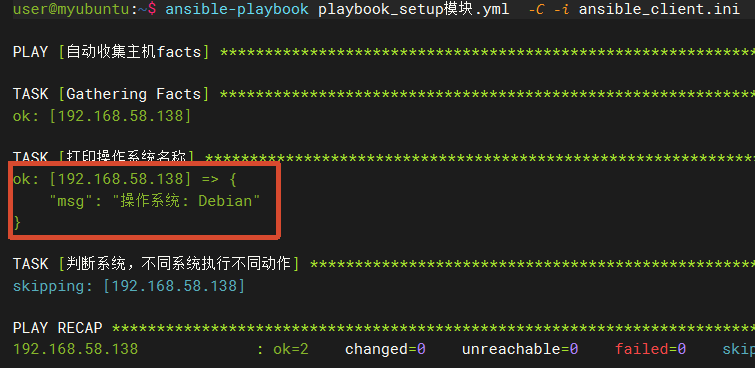](https://www.malaoshi.top/upload/0/3/1GW47mpdUemi.png) ### 打印上面常用的facts事实变量 创建 playbook 文件: ``` nano playbook_facts2.yml ``` 内容: ```yaml --- - name: 混合 var / msg 打印facts hosts: all gather_facts: true tasks: - name: 操作系统发行版 debug: var: ansible_facts['distribution'] - name: 系统主版本 debug: var: ansible_facts['distribution_major_version'] - name: 完整版本号 debug: var: ansible_facts['distribution_version'] - name: 系统家族 debug: var: ansible_facts['os_family'] - name: 系统架构 debug: var: ansible_facts['architecture'] - name: 内核版本 debug: var: ansible_facts['kernel'] - name: 短主机名 debug: var: ansible_facts['hostname'] - name: 完整FQDN域名(带容错,必须msg) debug: msg: "ansible_facts['fqdn'] : {{ ansible_facts['fqdn'] | default('N/A') }}" - name: 默认网卡IPv4(带容错,必须msg) debug: msg: "ansible_facts['default_ipv4']['address'] : {{ (ansible_facts['default_ipv4'] | default({})).address | default('N/A') }}" - name: 所有IPv4地址数组(带容错,必须msg) debug: msg: "ansible_facts['all_ipv4_addresses'] : {{ ansible_facts['all_ipv4_addresses'] | default([]) }}" - name: 总内存MB debug: var: ansible_facts['memtotal_mb'] - name: CPU逻辑核数 debug: var: ansible_facts['processor_vcpus'] - name: 包管理器 debug: var: ansible_facts['pkg_mgr'] - name: 服务管理器 debug: var: ansible_facts['service_mgr'] - name: 系统环境变量(带容错,必须msg) debug: var: ansible_facts['env'] ``` 执行: ``` ansible-playbook playbook_facts2.yml -C -i ansible_client.ini ``` # gather_facts 开关控制收集 关闭facts收集,按需收集子集,减少采集耗时,提升执行速度,大批量主机常用 `setup` 模块支持只采集部分类别,减少开销: - `min`:收集最小基础集 - `hardware`:硬件(CPU、内存、磁盘) - `network`:网络信息 - `virtual`:虚拟化信息 ### 例子 创建 playbook: ``` nano playbook_setup_指定采集.yml ``` 内容如下: ```yaml --- - name: 指定采集 hosts: all gather_facts: false # 关闭play自动采集 tasks: - name: 手动调用setup,限定采集子集 setup: gather_subset: min,hardware # 指定采集最小基础、硬件 - name: 操作系统发行版 debug: var: ansible_facts['distribution'] - name: 完整版本号 debug: var: ansible_facts['distribution_version'] - name: 系统家族 debug: var: ansible_facts['os_family'] - name: 总内存MB debug: var: ansible_facts['memtotal_mb'] - name: CPU逻辑核数 debug: var: ansible_facts['processor_vcpus'] ``` 执行: ``` ansible-playbook playbook_setup_指定采集.yml -C -i ansible_client.ini ``` # 使用场景&性能优化要点 1. **模板渲染**:jinja2模板中读取IP、主机名、系统版本,自动生成配置文件(nginx、sysctl) 2. **条件判断**:`when` 根据操作系统、内存大小、虚拟化类型分支执行任务 3. **异构环境**:同一套playbook同时支持CentOS、Ubuntu 4. **性能优化** - 大批量服务器:`gather_facts: false` + `gather_subset: min`,减少采集耗时 - 只需要IP:`gather_subset=!all,!min` + filter只读取自定义fact - facts只在play开头采集一次;如果远程机器修改了fact文件,**必须重新执行setup**刷新数据 # 常见坑 1. 关闭`gather_facts:no`之后,**不执行setup,ansible_facts为空,直接引用会报错** 2. filter匹配是模糊匹配,`filter=ansible_*`会返回所有匹配key 3. 自定义fact文件必须后缀`.fact`;脚本需要**有执行权限** 4. Windows主机同样支持setup模块,路径使用`C:\xxx`作为fact_path 原文出处:/show_1GW47nOGTqe5.html